
|
Symptoms The machine has a fault code SC142-00 when it is turned on. Reason
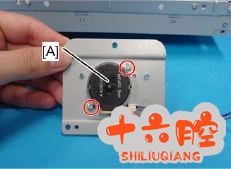
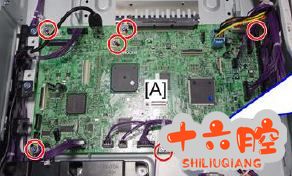
Maintenance process On-site maintenance measures: 1) Check the connection harness and whiteboard position between the machine scanning head and BICU board, clean the exposed glass and optical parts of the machine, and start the machine to detect faults that cannot be eliminated. 2) Replace the scanning head and connecting harness of the machine, but the fault still exists. 3) Replace the BICU board and scanning motor of the machine, and troubleshoot. (Note: Due to the phenomenon of the scanning motor not rotating flexibly and getting stuck when removed, the BICU board is damaged and faulty. It is recommended to replace both the scanning motor and the motherboard at the same time.)
Solution Replace the machine scanning motor and BICU board, and the machine is functioning properly. |
Address of this article:https://073868.com/post/1268.html
Copyright Notice:
For relevant infringements, reports, complaints and suggestions, please send E-mail:weixiuwang68@qq.com
Tags: #BICU Board #Scanning motor #SC142 #305






