
|
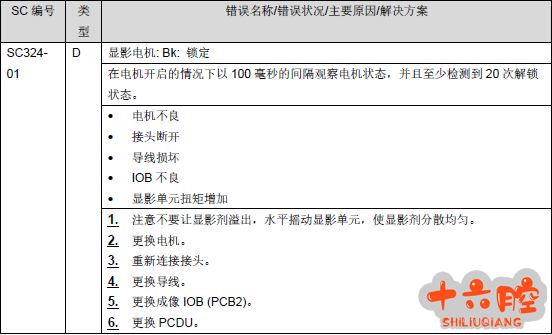
Symptoms When the machine is turned on to print and copy, there is a fault code SC324-01.
Maintenance process On-site maintenance measures: 1) Disassemble and inspect the relevant connection harnesses, wire connectors, and reinstall the IOB board of the machine. Weight PCDU. The fault cannot be eliminated by starting the machine for detection. 2) Replace the BK developing motor and IOB board of the machine, but the fault still persists. 3) Replace the black PCDU unit of the machine and troubleshoot. (Note: Upon opening the black PCDU unit and inspecting the developing chamber, it was found that the developer had clumped towards the rear end.). Uneven dispersion causes fault codes) Solution Replace the black developing unit of the machine, and the machine test is normal. |
Address of this article:https://073868.com/post/5672.html
Copyright Notice:
For relevant infringements, reports, complaints and suggestions, please send E-mail:weixiuwang68@qq.com





