
|
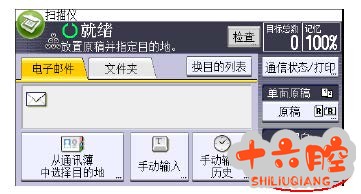
Problem It needs to be scanned to a USB drive, but there is no "save file" option on the scanning interface. How to use 1. Choose and install HDD. 2. Confirm that scan SP1013 is set to 1 3. Scan the interface and click on send settings
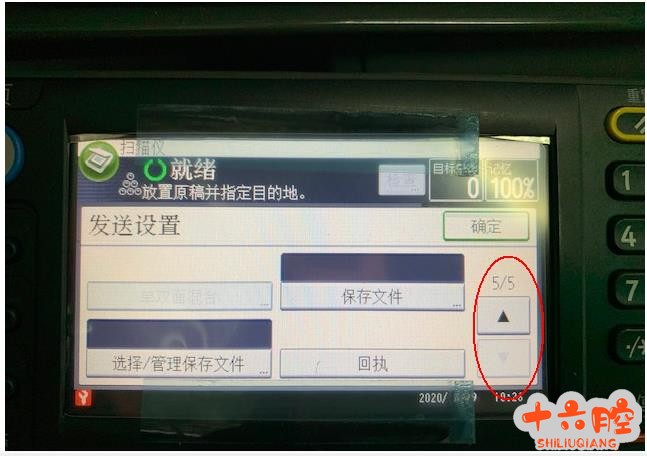
4. Press the down arrow 4 times (page 5) and select Save File.
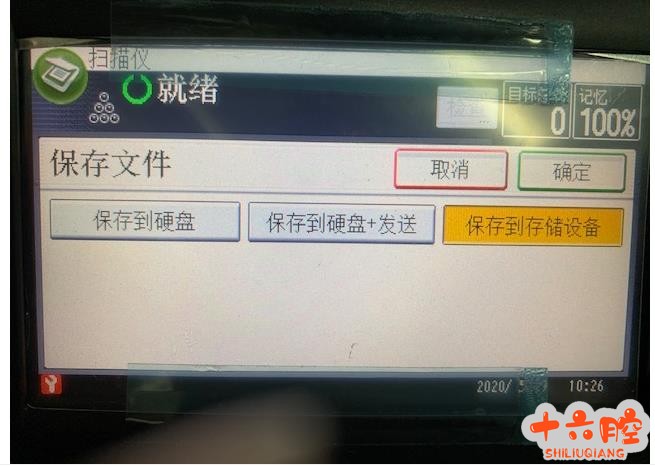
5. Choose to save to storage device.
|
Address of this article:https://073868.com/post/994.html
Copyright Notice:
For relevant infringements, reports, complaints and suggestions, please send E-mail:weixiuwang68@qq.com
Tags: #Scan #USB flash drive #2001 #2501





