|
1. maintenance mode function setting steps: NOTE: Make sure that the service mode function setting procedure is sufficiently secure. Do not allow unauthorized personnel who are not involved in the maintenance work to view it. A. Steps:
- Press the Utility/Counter (Utility/Counter) key.
- Touch [Check Details].
- Press the following keys in turn: Stop → 0 → 0 → Stop → 0 → 1
Note:
- If you select [CE Authentication](in service mode) under [Security Settings](security settings), you must authenticate with the CE password.
Enter the 8-digit CE password and touch \[END]. (The initial setting for the CE password is "92729272").
- Do not forget the CE password. If you leave the CE password, it is necessary to replace the RAMU board with a new one and contact the responsible personnel of KMBT.
- The service code entered is displayed as "?".
- The Service Mode menu appears:
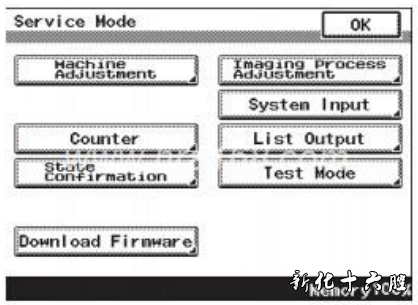
- Note:
- Be sure to change the default value of the CE password.
- For steps to change the CE password, see Security Settings.
- Exit.
- Touch the [OK] key. Note: When changing the setting value in the service mode, be sure to turn off the main power supply and then turn it on again.
- Change the setting value in the service mode function:
- Use the []/[-] keys to enter or change the setting value.
- Use the numeric keypad to enter the setting value. [To change the setting, press the Clear key before entering]
2. Maintenance Mode Function Tree: ? The displayed function tree conforms to the format on the screen.
| Service Mode | | Machine Adjustment | Fusing Temperature | Heater Roller | | (Machine adjustment) | (Fixing temperature) | Pressure (Pressurized) | | Fusing Transport Speed | | Printer Area | Leading Edge Adjustment (Main Edge Adjustment) | | (Printer area) | Centering (centering) | | | Centering (Duplex 2nd Side) | | | Feed Direction Adjustment (FD direction adjustment) | | | Test Copy | | Scan Area | ADF Adjustment | Zoom | | (Scan area) | (ADF adjustment) | Feed (paper feed) | | | | Regist Loop | | | | Erasure Width | | | | Paper Passage (paper path) | | | BK-S | Zoom | | | Adjustment | Feed (paper feed) | | | (BK-S adjustment) | Erasure Width | | | | Carriage Move | | | Shading Position (shading position) | | | Test Copy | | Printer Regist Loop (print alignment amplitude) | | Color | Cyan (Cyan) | | Reg. Adjustment | Magenta (magenta) | | (Color alignment adjustment) | Yellow (yellow) | | Manual Bypass Tray Adjustment | | Lead Edge Erase Adjustment (Main Edge Elimination Adjustment) | | Touch Panel Adjustment | | Imaging Process | Gradation Adjust | Gradation (color level) | | Adjustment | (Color level adjustment) | Resolution (resolution) | | (Image processing adjustment) | | High Compression Mode | | D Max Density (default maximum concentration) | | Background Voltage Margin (background voltage limit) | | Transfer Output Fine | Secondary transfer adj. (second transfer adjustment) | | Adjustment | | (Transfer Output Trim) | Primary transfer adj.(first transfer adjustment) | | Image Stabilization | Initialize Stabilization (initialization + stable) | | (Image Stabilization) | Stabilization Only (stability only) | | Thick Paper Density Adjustment (Thick Paper Density Adjustment) | | Toner Supply | | Monochrome Density Adjustment (monochrome density adjustment) | | Dev. Bias Choice |
| Service Mode | | CS Remote Care | | System Input | Marketing Area (Sales Region) | | (system input) | Exhaust Fan Stop Delay | | Serial Number | | No Sleep | | Foolscap Size Setting (Foolscap size settings) | | Install Date | | Change Fixed Zoom | | File Display (File Display) | | Memory Clear | System Data | | (Memory Clear) | System Error | | | Image Data | | | Own Setting (own settings) | | | Fax dest. | | | Activity (Activity) | | | Soft SW | | Software Switch Setting (Soft Switch Settings) | | Consumable Life Reminder (Consumables Life Reminder) | | Unit Change | | Option Settings | | Center Erase Width | | IU Life Setting (IU Life Setting) | | Counter | Life (service life) | | (Counter) | Jam (paper jam) | | Service Call Counter (Service Reminder Counter) | | Warning (Warning) | | Maintenance (Maintenance) | | Service Total | | Service Call History (Data) [Maintenance Reminder Record (Data)] | | ADF Paper Pages | | Paper Jam History | | Fax Connection Error | | List Output | Service Call Report | | (List output) | Protocol Trace | | File Dump | | | | | | | | Service Mode | | State Confirmation | Sensor Check (Printer) | | (Status Confirmation) | Sensor Check (Scan) | | Table Number | | Level History | | Temp. & Humidity (Temperature and Humidity) | | Color Regist. | | IU Lot No. (IU lot number) | | Machine Configuration (machine configuration) | | State Confirmation | Sensor Check (Printer) | | (Status Confirmation) | Sensor Check (Scan) | | Table Number | | Level History | | Temp. & Humidity (Temperature and Humidity) | | Color Regist. | | IU Lot No. (IU lot number) | | Machine Configuration (machine configuration) | | Test Mode | Gradation Pattern (Level Style) | | (Test Mode) | Halftone Pattern (Halftone Style) | | Lattice Pattern (lattice lattice style) | | Color Reproduction (color reproduction) | | Running Mode | | Fax Settings (Fax Settings) | Self-Telephone #(from phone number) | | Internet ISW | Internet ISW Set Internet | | HTTP Setting (HTTP Settings) | | Forwarding Access Setting (Forward Access Settings) | | Download Firmware | Engine | | (Download Firmware) | Job Sep. |
|
