|
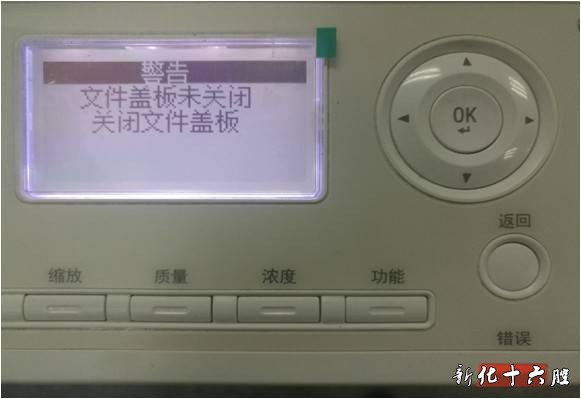
Today, I’ll share how to handle the VA model’s warning message indicating that the file cover is not closed. <机型> 206/216/226/236/246/7223/266/306/7228 <故障现象> DF-625 the document feeder is installed on the VA model, when the document feeder is placed, the warning "Document cover is not closed/Document cover is closed" appears on the panel ".
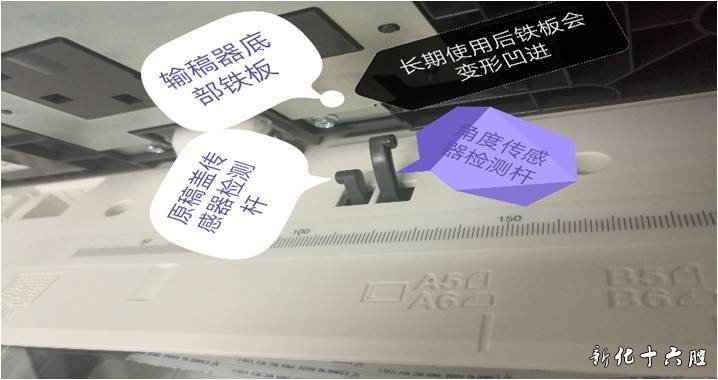
<原因分析> As shown in the following figure: after long-term use, the iron plate at the bottom of the DF-625 corresponding to the sensor detection lever is deformed and bent (depressed). after the document feeder cover is lowered, the angle sensor detection lever (long lever) has blocked the angle sensor, but the document cover sensor detection lever (short lever) cannot be completely pressed down. if the document cover sensor is not blocked, the display screen will indicate that the document cover is not closed.
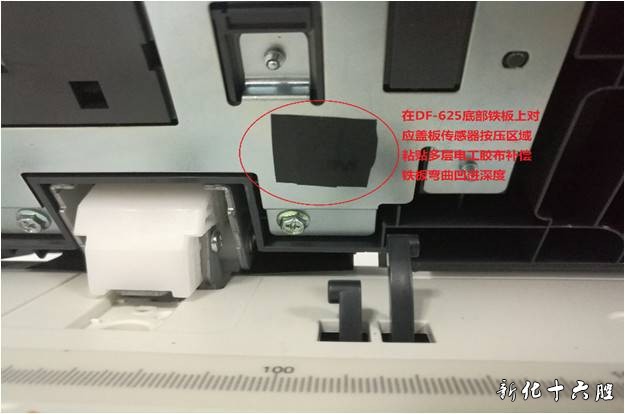
<场地对策> When "the display document cover is not closed" frequently occurs, paste multi-layer electrical tape on the iron plate area at the bottom of the DF-625 corresponding to the position of the detection lever of the cover sensor to ensure that the original cover sensor can be blocked when the document feeder is covered.
|
Kemei VA Model Prompt Warning Document Cover Not Closed
314
0