
|
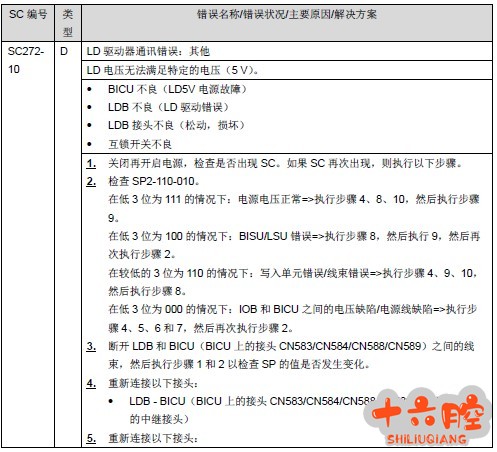
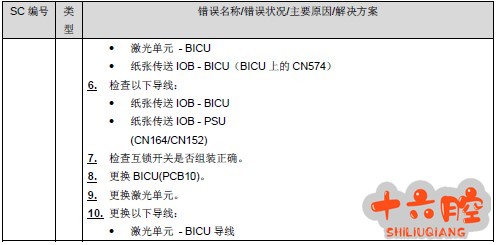
After powering on, the display shows: “Checking machine status… Please wait.” Then restart; after restarting, error code SC272-10 appears. Adjustment process 1) Query SC272-10 code comments:
2) According to the above processing method 1-5 steps, the fault remains. 3) Replace the BICU board, the fault remains. 4) replace the laser unit test, the fault is still. 5) According to the dot diagram of this model, use a multimeter to measure the harness from the laser unit to the BICU, and no abnormality is detected. After replacing the harness, the machine is normal. Solution Replace the harness from laser unit to BICU. Trouble solved. |
Address of this article:https://073868.com/post/6083.html
Copyright Notice:
For relevant infringements, reports, complaints and suggestions, please send E-mail:weixiuwang68@qq.com






