
|
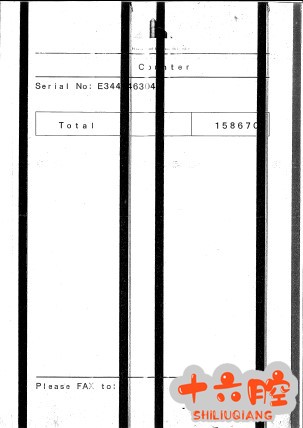
Ricoh MP2014 machine printing and copying shows black bars with vertical paper direction (down)
Diagnostic process 1) This fault occurs during copying/printing, so troubleshoot the scanning department. 2) Check the internal optical path and hexagonal prism of the laser unit, no abnormalities were found. After cleaning the laser unit, the fault still persists. 3) Check the high-voltage board and plug, unplug the plug again, the fault still persists. 4) Check the drive and connection of the developing chamber, and no abnormalities were found. 5) Check the connection between the drum grounding plate and the machine in the PCU, clean the charging and grounding connections, and the fault persists. 6) Replace the PCDU and the image is normal. 7) After retesting and replacing the OPC drum in the faulty PCDU, the problem was resolved. 8) OPC drum malfunction, image normal after replacement |
Address of this article:https://073868.com/post/5825.html
Copyright Notice:
For relevant infringements, reports, complaints and suggestions, please send E-mail:weixiuwang68@qq.com
Tags: #2014 #Black stripe #Scan







