
|
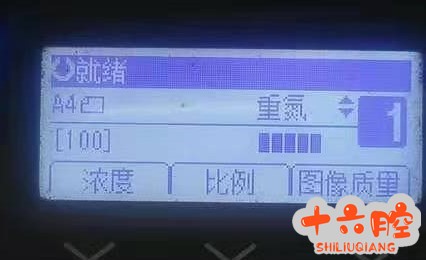
MP2014/2014D/2014AD Ricoh MP2014 display error diazo After the machine is turned on, it displays "diazo" in the original type position, as shown in the following photo:
Diagnostic process 1) Check the settings in the user tool and restore them to factory default settings, but the fault persists. 2) Execute SP5-801, the fault persists.. 3) Upgrade the host firmware to the latest version, but the issue persists. 4) Replace the MPU board, but the fault persists. [kkpay=3]5) Replace EEPROM and resolve the issue. Solution After replacing the EEPROM, the machine is functioning normally.[/kkpay] |
Address of this article:https://073868.com/post/5793.html
Copyright Notice:
For relevant infringements, reports, complaints and suggestions, please send E-mail:weixiuwang68@qq.com







