
|
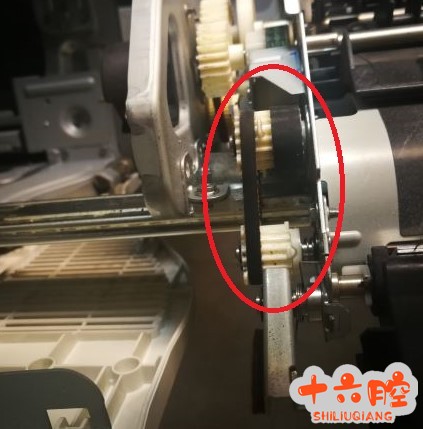
The machine jams during paper output, and the paper stops at the fixing unit (the paper has not yet been output from the unit). Analysis process: Checking SP7504, it was found that the paper output sensor recorded a high number of paper jams. Using SP5803 to check the sensor, it was found to be normal. Use output inspection to check the paper output motor of the paper output unit, which is running normally. Pulling out the drawer unit for inspection, it was found that the paper output gear had been severely worn and the paper output belt had fallen off. Upon rechecking the interior of the machine, residual paper was found at the corresponding position of the worn gear. The paper was removed for inspection and found to have been severely worn. Cause analysis: Machine paper jam, when the customer pulls out the drawer unit to retrieve the paper jam, half of the paper is stuck inside the machine that the customer did not notice. At this time, the drawer unit can also be reset. After resetting, the paper gets stuck between the machine and the paper output drive gear, causing the paper output belt to fall off and the gear to wear out after prolonged use. The machine is functioning normally after replacement.
Solution: Replace the drive gear and belt, and troubleshoot. |
Address of this article:https://073868.com/post/5755.html
Copyright Notice:
For relevant infringements, reports, complaints and suggestions, please send E-mail:weixiuwang68@qq.com






