
|
IMC2000SP startup without black color; SP2-109 Fault Sample
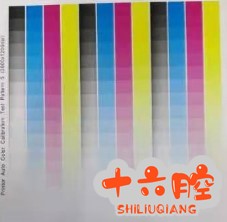
Possible causes: PCDU malfunction/board circuit malfunction; Maintenance process 1. Print SP2-109 full-color test page for testing, with only a small amount of black frame on the edges of the black solid color sample; 2. When viewing the printed color sample, the black color is lighter and significantly different from the 2-109 sample (as shown in the figure below);
3. Print the counter, the color is relatively normal (still slightly light);
4. Execute SP3-111 and 2-011 for line position adjustment and process control adjustment, both failed, check the control sample diagram, no black; 5. Replace the black PCDU for testing, but the fault persists; 6. Replace the ITB unit for testing, but the fault persists; 7. Replace the BICU for testing, but the fault persists; Solution 8. Recheck the placement of the black PCDU and find that the high-voltage shrapnel of the black PCDU is deformed (developing high voltage). After re correction, the image is normal; After re correcting and developing the high-pressure film, the image is normal and the fault is repaired; |


Address of this article:https://073868.com/post/5704.html
Copyright Notice:
For relevant infringements, reports, complaints and suggestions, please send E-mail:weixiuwang68@qq.com






