
|
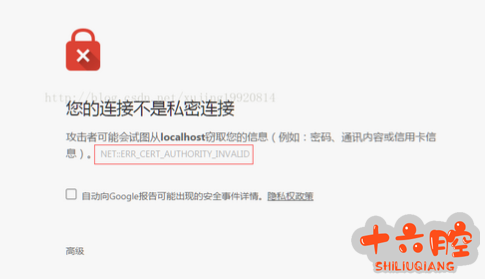
Symptoms Chrome cannot open the machine web page when https is enabled. Solution: In general, when MFP enables https and disables http, using browser chrome to open the machine web page will prompt that the web page is unsafe, as shown in the following figure: You can click to continue to visit, you can normally open the MFP web page. However, for the new version of chrome, there is no option to continue accessing and the webpage cannot be opened normally, as shown in the following figure:
This is due to the browser's security settings, which restrict access to unsafe websites.Solution: When the warning page in the above figure appears, click anywhere on the page and enter the keyboard.“thisisunsafe"This12Characters, you can open the web page normally, and there will be no warning page when you open the web page again later.remarks: entered12Characters will not be displayed, be careful not to enter the wrong key, and do not need to enter the enter key. |
Address of this article:https://073868.com/post/5625.html
Copyright Notice:
For relevant infringements, reports, complaints and suggestions, please send E-mail:weixiuwang68@qq.com
Tags: #https #3500 #6000 #Web pages are not secure #thisisunsafe







