
|
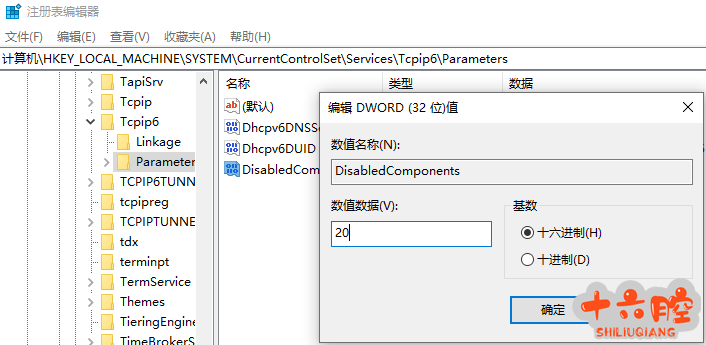
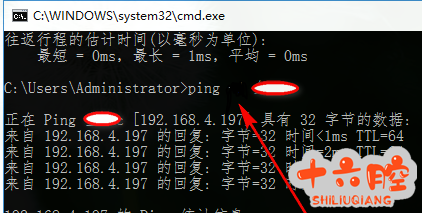
Symptoms Scan to folder is set, and after using it for a period of time, it is found that the scan and send failed. Solution: 1. The test destination uses the format of IP address (for example:\192.168.1.100\scan), and the file can be sent successfully, but the format of host name (for example:\pc001\scan) is used, and the sending fails; 2. Try to use the ping command and find that the IP V6 address is returned; 3. On the computer where the destination folder is located, modify the registry and use the ping command again to return the IP V4 address normally, test the scan, and send the scan file successfully. Modification method: find HKEY_LOCAL_MACHINE\SYSTEM\CurrentControlSet\Services\Tcpip6\Parameters, which has a DisabledComponents item. if not, create a new one (DWORD 32 bits). enter 20 (hexadecimal, 32 if decimal).
|
Address of this article:https://073868.com/post/308.html
Copyright Notice:
For relevant infringements, reports, complaints and suggestions, please send E-mail:weixiuwang68@qq.com
Tags: #2500 #Scan send failed #SMB #3500 #6000







