
|
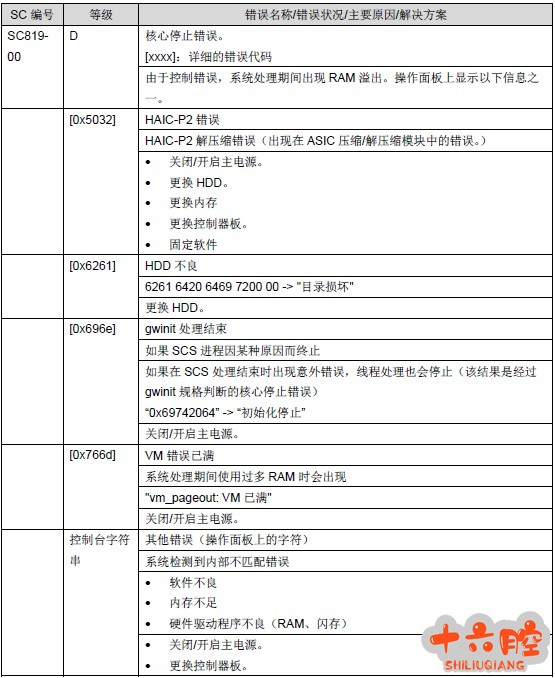
Symptoms SC819-00 code appears during startup. Adjustment process 1) Please refer to the following figure for the annotations of maintenance manual SC819-00:
2) Due to SC819 code appearing upon startup, it cannot run to the firmware upgrade interface, therefore firmware upgrade cannot be implemented. 3) Check the wiring harness of the host controller board, IPU, BCU and other boards, unplug and plug in all plugs again, but the fault still persists. 4) Replace the memory, but the fault persists. 5) Replace the hard drive, but the problem persists. 6) Replace the controller board, but the fault persists. 7) After replacing the NVRAM, the machine is functioning normally. Solution After replacing the NVRAM (chip) on the control board, the machine returned to normal. |
Address of this article:https://073868.com/post/5590.html
Copyright Notice:
For relevant infringements, reports, complaints and suggestions, please send E-mail:weixiuwang68@qq.com







