
|
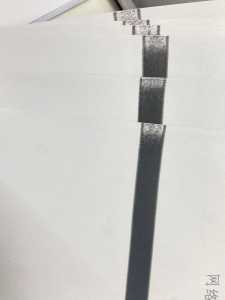
Symptoms: There are black bars along the paper output direction when the machine prints, as shown in the picture
Measures: 1. Clean and inspect the drum and charging unit. 2: Check SMC 7-403 and see the error record as follows, error SC305 is reported 3: Check the aging of the charging unit and clean the charging corona wire midway. Solution 1. Adjust the cleaning brush to its original position and clean the charging unit and electrode wires. Change 2-804-011 to 0 unclean corona wire. 3. Replace the charging unit with a new one later. |
Address of this article:https://073868.com/post/5548.html
Copyright Notice:
For relevant infringements, reports, complaints and suggestions, please send E-mail:weixiuwang68@qq.com
Tags: #SC305 #Charging rack #7502 #6002 #9002







