
|
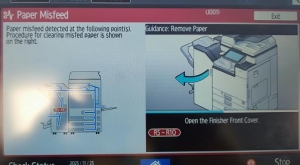
Symptoms: Display j001 R5-R10 paper jam.
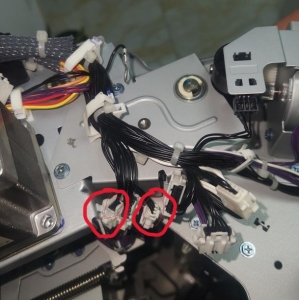
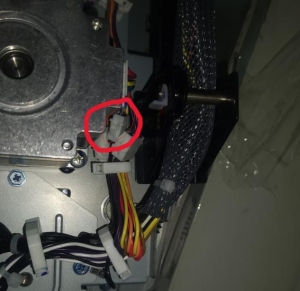
Analysis: By understanding the situation of the malfunction, the booklet binding unit showed R5-R10 paper jam. After disassembling the booklet unit and taking out shredded paper, the malfunction still did not disappear after installation. The possible reasons for the R5-R10 paper jam by consulting the manual are: a) Stacking and conveying b) Rear edge positioning block transmission c) The paper has not reached the middle and folded out d) Fold the paper in the middle. Because it is cardboard, the booklet binding unit was disassembled and the plug was unplugged during the process of removing the cardboard. And indeed, shredded paper has been taken out from the booklet paper path. Based on this, it is unlikely that the hardware is faulty, and it cannot be ruled out that the plug may be plugged in incorrectly or not. Measures: Firstly, observe the wiring and ensure that there are no unconnected harnesses. 2. Observing the action of the booklet binding unit, it was found that the folding board was not in the correct position - blocking the paper path, causing the paper to not move down to the correct position. 3. Use input detection to check: folding plate in-situ sensor, folding plate cam in-situ sensor, booklet upper sensor, edge stop sensor. It was found that the folding plate in-situ sensor and booklet upper sensor triggered abnormalities. 4. Check and confirm that the sensor plug connection is incorrect through the dot plot electrical component layout and wiring diagram. As shown in the figure below: The sensors are all 3-core plugs, and there are differences in plug color and wiring position. Before unplugging or plugging, they should be marked or photographed.
Solution: Connect the sensor wiring correctly and troubleshoot. Special Notice: When disassembling related parts, key information such as which plugs on the circuit board are vacant, wiring positions, positioning positions, and whether there are identical or similar plugs in the same area should be captured by taking photos with a mobile phone to avoid errors during installation. |
Address of this article:https://073868.com/post/5516.html
Copyright Notice:
For relevant infringements, reports, complaints and suggestions, please send E-mail:weixiuwang68@qq.com






