
|
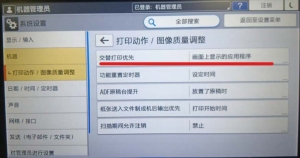
Related models: IMC2010-6010;IM2500-IM6000 Symptoms: Customer feedback often shows that printing and copying tasks are mixed together and cannot be distinguished; Maintenance process: 1. Upon reviewing the erroneous assignments provided by the client, it was found that there was indeed confusion in the assignments; 2. On site testing found that during the copying process, if a printing task enters the machine and the print icon on the screen is clicked to print, the job will pause the copying task, switch to the printing task for output, wait for the printing to be completed, and then continue the copying job. This ultimately leads to the mixing of copying and printing jobs, causing customer dissatisfaction; 3. Execute the overall cleaning of SP5801-003 and later, and initialize the hard disk in the user tool. If the problem still exists, it indicates that this situation is not caused by user settings being modified; 4. There is a "alternate printing priority" setting in "User Tools - System Settings - Machine - Print Actions/Image Quality Adjustment";
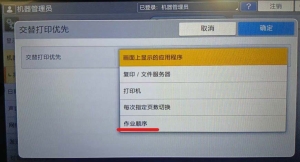
5. In the "alternate printing priority" setting, the priority order of the job can be modified. The default is "application displayed on the screen". After changing to "job order", the job will switch to other jobs for output after the previous job is completed, avoiding the situation where the contents of various jobs are staggered together;
|
Address of this article:https://073868.com/post/5529.html
Copyright Notice:
For relevant infringements, reports, complaints and suggestions, please send E-mail:weixiuwang68@qq.com
Tags: #Homework interleaving #2500 #C2010 #Alternate printing priority #6000







