
|
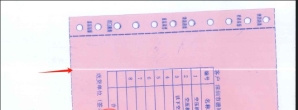
Fault site There are white lines on the glass plate scan (as shown in the figure below)
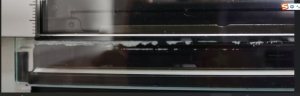
on-site handling The cleaning of the optical path glass has not improved, the problem of replacing the scanning head unit components still persists, the firmware upgrade and system cleaning issues still persist, and the automatic paper feeding and scanning of the test feeder are normal. Solution According to the principle analysis, the automatic document feeder scans optical dirt as black lines, while the glass plate scans white lines as optical path dirt (both have been cleaned). The glass plate scanning will perform white level correction based on the whiteboard under the standard ruler. Finally, it is found that the double-sided adhesive next to the standard whiteboard has overflowed and shifted just at the position of the whiteboard ruler. Upon opening the standard ruler, the following image can be seen. After cleaning and quickly applying the adhesive, it returns to normal.
|
Address of this article:https://073868.com/post/5459.html
Copyright Notice:
For relevant infringements, reports, complaints and suggestions, please send E-mail:weixiuwang68@qq.com
Tags: #6055 #Scan the white line #4055 #glass plate #3055







