
|
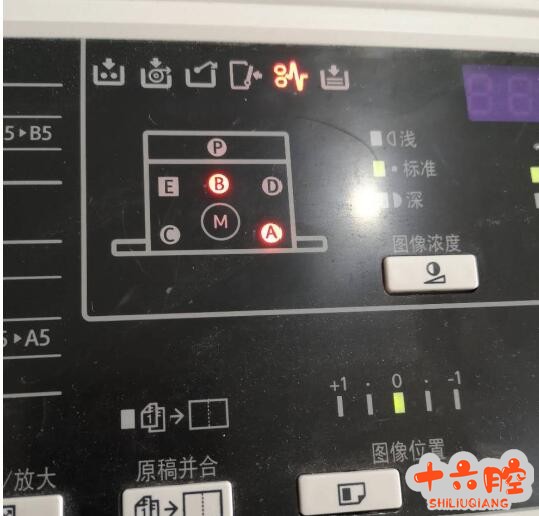
Symptoms: After the machine completes printing, it prompts that there is a paper jam in Zone A and Zone B. However, in reality, there is no paper or foreign object blocking the corresponding area of the machine. Pressing any button cannot clear the paper jam symbol. Restarting the machine can be used normally, but after printing is completed, it still prompts that Zone A and Zone B are paper jams and cannot proceed to the next job.
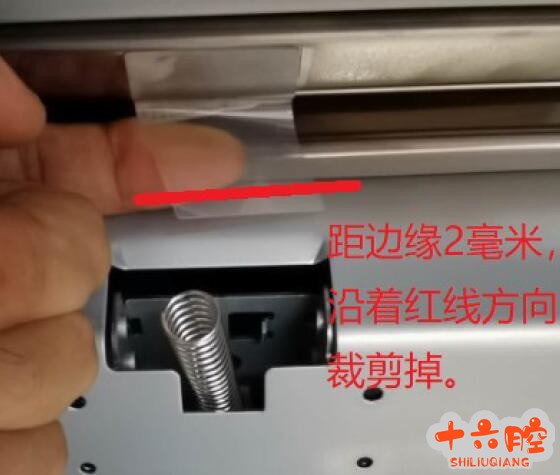
Analysis reasons: 1. Check the paper roller and friction pad, no abnormalities found; 2. Changing the printing quantity of a single job, the malfunction persists; 3. Replace the paper, the fault persists; 4. Check the sensor corresponding to the position of the A/B card jam, no abnormalities found; 5. Check the polyester sheet in the paper feeding section, suspecting that the polyester sheet is too long and has blocked the alignment sensor, triggering the machine's paper jam detection. Try cutting the polyester sheet by 2 millimeters, and the paper jam symbol no longer appears. The machine is working normally.
Solution: Cut the polyester sheet by 2 millimeters. |
Address of this article:https://073868.com/post/5402.html
Copyright Notice:
For relevant infringements, reports, complaints and suggestions, please send E-mail:weixiuwang68@qq.com
Tags: #Paper jam #3344 #Polyester sheet #Sensor







