
|
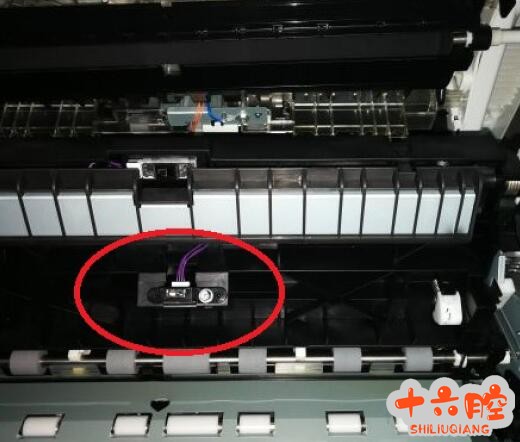
Symptom: The machine indicates that the toner bottle is empty, and the toner signal cannot be eliminated after replacing with new toner. Maintenance process: 1. Open the front door of the machine and close it after a period of time without clearing the powder signal. 2. Check the lower toner port of the developing unit and find that there is no toner here. 3. Checked the powder supply unit of the machine and found no abnormalities. 4. Execute mandatory powder replenishment, the machine has a running sound but still cannot clear the powder replenishment signal. 5. Check that the result of SP3-031 is 1, indicating successful initialization. Check that the SP3-210 value is 2.67V, which is within the normal range. 6. Use SP5-824 to backup NVRAM data and execute SP5-801. After clearing, add powder signal to clear. After continuously copying about 100 pages, the powder signal reappeared. 7. Execute SP3-011 (manual process control), display failed. Check SP3-630-001 (ID sensor output), the value is 0. Considering that the ID sensor will participate in process control, it was found that its surface was covered by toner during the inspection of the ID sensor. After cleaning, SP3-320 (ID sensor initialization) and SP3-011 were re executed, and the results showed success, with VSP=0.49V. After reopening the front door, the machine began to replenish and the powder signal was eliminated. 8. Continuously copied 200 pages without any powder signal from the machine. Checked SP3-210 and the output value was 2.36V. The fault was resolved. (The following picture is taken after removing the transfer roller)
Solution: Clean the ID sensor and re execute manual process control to resolve the issue. |
Address of this article:https://073868.com/post/5620.html
Copyright Notice:
For relevant infringements, reports, complaints and suggestions, please send E-mail:weixiuwang68@qq.com
Tags: #2555 #3055 #ID sensor #add powder #Developing






