
|
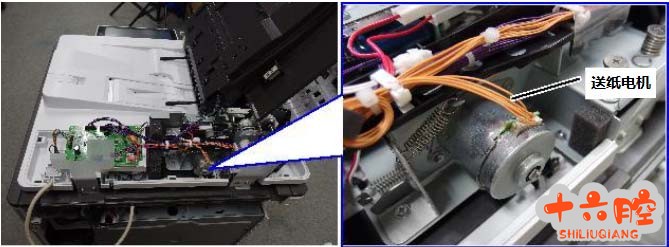
Symptoms Fault: DF3110 paper jam. Maintenance process When using DF3110 for copying, there is a paper jam on the machine. First, print the machine counter page normally and confirm that the paper jam is caused by DF, not by the machine's printing engine. When the paper jam occurs, the paper stops at the original placement position and the paper roller does not move downwards. The original paper jam record in SP7508 is 13, and the position of the paper jam in SP7505 is recorded as the skew correction sensor. 3. SP6007 was used to test the 009 original placement sensor, 011 skew correction sensor, and 016 lifting sensor, all of which were normal, and the fault caused by the detection was ruled out; Continuing to use SP6008 to test the forward and reverse rotation of the paper feeding motors 003 and 004, the motors made abnormal noises but did not move.
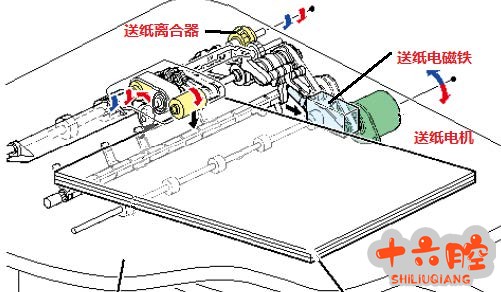
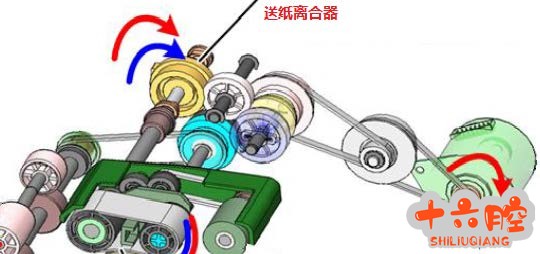
4. Remove the paper feeding motor and use SP6008-003 and 004 again to test that the motor is running normally. The reason for the abnormal noise caused by the inability to rotate is due to the biting of the driving part of this motor. 5. According to the principle of DF paper feeding, after pressing the "start" button, the paper feeding electromagnet will close the brake claw, and at the same time, the paper picking wheel will descend to the surface of the paper. After that, the paper feeding motor will start running and the paper feeding clutch will be activated to start feeding the paper picking wheel.
6. Manually press down the brake claw and rotate the paper feeding clutch, both clockwise and counterclockwise rotating normally without any jamming.
Note: Failure to lower the brake claw will result in the inability of the paper feeding motor drive mechanism to operate. According to the above test results, the paper feeding mechanism is normal, and the fault may be caused by the brake claw not automatically pressing down. When continuing to check the paper feeding electromagnet, no abnormalities were found and there were no relevant output codes for testing. Therefore, a replacement test was carried out directly. After replacement, DF paper feeding was normal and the fault was eliminated. Solution After replacing the paper feeding electromagnet, troubleshoot the issue |
Address of this article:https://073868.com/post/5383.html
Copyright Notice:
For relevant infringements, reports, complaints and suggestions, please send E-mail:weixiuwang68@qq.com
Tags: #DF3110 #C2000 #Document Feeder #Paper jam






