
|
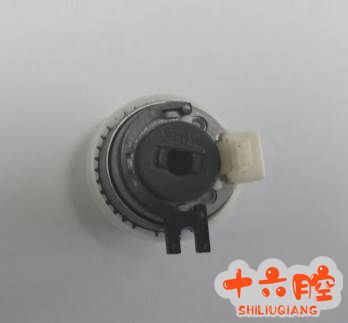
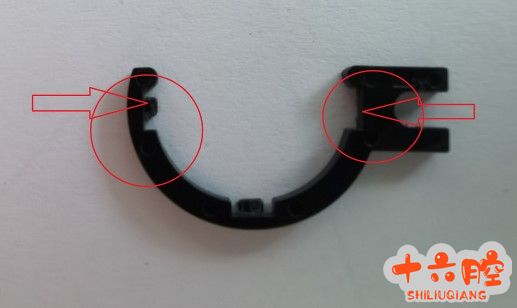
Symptom: Cardjam appears when using ARDF3110 for copying or scanning Analysis process: 1. Clean the paper roller and feeding belt inside the document feeder, but the fault persists. 2. Replace the entire paper rolling component for testing, and the fault persists. 3. Observing the paper feeding device, it was found that the paper feeding wheel and feeding belt did not rotate during the paper feeding process. 4. Disassemble the back cover of the document feeder and use output inspection to test the paper rolling clutch. There is a suction sound. After disassembling the clutch, it was found that the 'U' - shaped slot of the positioning clutch was damaged, causing the power to not be transmitted to the paper rolling component when the clutch was engaged, which is the cause of paper jam. Replace the paper clutch and send the document feeder to operate normally. (Below image)
Visually, it is impossible to determine whether there is a fault. After disassembly, it was found that the 'U' slot and corner of the fixed clutch were broken. The area inside the red circle on the left is normal, while the area inside the red circle on the right has already been broken. Solution: After replacing the paper clutch, the problem was resolved. |
Address of this article:https://073868.com/post/357.html
Copyright Notice:
For relevant infringements, reports, complaints and suggestions, please send E-mail:weixiuwang68@qq.com
Tags: #Paper feeder #Photocopy #Scan #Paper jam #2500





