
|
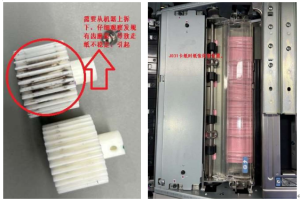
Symptom: The 8 series black and white printer intermittently reports paper jams J031 and J082 during the printing process Reason: J031: Gear wear on the moving roller of the alignment unit; J082 PTB drive roller shaft sleeve stuck; Solution: During the on-site inspection of the machine, the paper jam occurred irregularly and could continuously print hundreds of prints. However, when J031 occurred, there was definitely paper stuck in front of the alignment rotating door. Upon careful observation, wrinkles appeared on the surface of the paper, as if it was obstructed by foreign objects while moving forward. Nevertheless, the paper path was normal, and no abnormalities were found when checking the rollers at the paper's stopping position. Upon rechecking the drive section, it was discovered that three teeth on the drive gear were worn (the gear is installed on the machine and is difficult to observe wear, so it needs to be removed and observed from the side). After replacement, J031 disappeared; If the customer's machine is not configured with LCT large capacity paper box, it can be replaced with the gear on the right side of the machine (there are two of the same model on the machine);
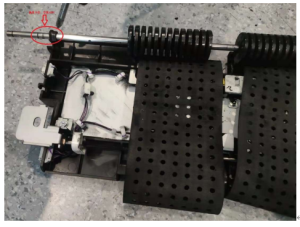
J082 is relatively easy to identify the problem. Every time the paper stays at the PTB unit and rotates the PTB belt by hand, it doesn't feel smooth. After removing the unit and inspecting, it was found that there was resistance in the drive roller shaft sleeve. After cleaning and lubricating, the printing was normal. |
Address of this article:https://073868.com/post/3374.html
Copyright Notice:
For relevant infringements, reports, complaints and suggestions, please send E-mail:weixiuwang68@qq.com
Tags: #J031 #J082 #8300 #8210 #Drive roller shaft







