
|
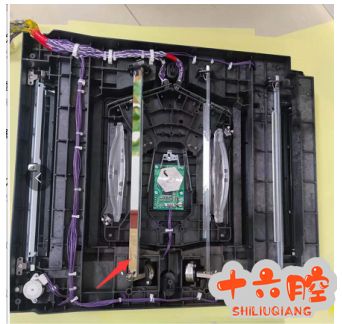
Detailed symptoms: Ricoh MPC5503 prints red font with uneven color and color deviation. Fault diagnosis: In maintenance mode, use 2109 to test and print full-color samples of the red drum, and determine whether the red drum is aging or caused by uneven powder on the developing chamber. Maintenance process: 1. The customer has a spare red drum, which needs to be replaced and initialized for color calibration. It was found that the color gradient of the red stripe on the sample was significantly lighter (compared to other colors, as shown in Figure 2 below). It is suspected that improper transportation or placement may have caused uneven carrier. Shake the developing chamber evenly and perform TD initialization, but there is little improvement in printing testing. 2. Viewing the initialization result of SP3210-3 red TD, the value is low (1.73V). I did 3050 red powder replenishment and initialization, and the printing test effect did not improve significantly. 3. Considering that the customer's yellow drum aging caused powder flying and resulted in severe machine pollution recently, the laser was dismantled for inspection and dust was found on the reflective glass strip of the red drum. After cleaning it thoroughly (as shown in Figure 4 below), the test print sample was normal and the red text was printed normally.
|
Address of this article:https://073868.com/post/3337.html
Copyright Notice:
For relevant infringements, reports, complaints and suggestions, please send E-mail:weixiuwang68@qq.com
Tags: #5503 #Uneven color of red font #Red light #Light color #Laser







