
|
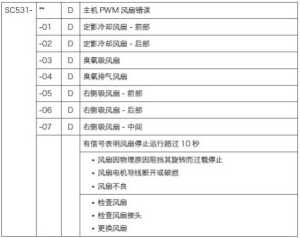
Symptoms: Irregular Error Reporting SC531-03 in Printing 05 06 07 Reason: Poor contact due to wear of copper sheet on charging net, abnormal drum potential detection and irregular code
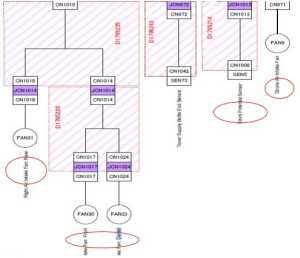
1. Test the ozone suction fan according to the code. The front, middle and rear fans of the right suction fan are all normal, and the exchange test with other machines is also normal, thus judging that the fan is normal. 2. After checking the circuit diagram, it was found that the fan and drum potential sensors and the toner use-up sensors were all connected to the plug CN220 on the IOB board. The plug code was still irregularly plugged.
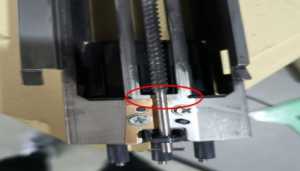
3. There was no problem in the middle of the toner used up sensor during printing, thus it was suspected that the drum potential sensor might be abnormal. Check the surface of the photosensitive drum without abnormality. Test and check the charging net. It was found that the copper sheet part and the upper screw part were not in conduction. After removal, the contact part between the two was found to be worn. After re-polishing and adjustment, the installation test was in normal conduction. Subsequent test and printing was normal without relevant codes.
Solution: The temporary treatment method can adjust and polish the deformed and worn part of the copper sheet on the charging net, and then directly replace the new charging net assembly. Summary: After excluding the problems referred to in the code reported by the machine in the maintenance, we often have no idea and do not know the direction of the next maintenance. At this time, we need to use the circuit diagram to judge whether other parts on the related line will lead to these problems, especially when several codes appear irregularly, we should pay special attention to them, sort out the thinking and find the right direction, so as to get twice the result with half the effort. |
Address of this article:https://073868.com/post/3275.html
Copyright Notice:
For relevant infringements, reports, complaints and suggestions, please send E-mail:weixiuwang68@qq.com
Tags: #SC531-03 #8120 #8100 #SC531-06 #drum potential sensor







