
|
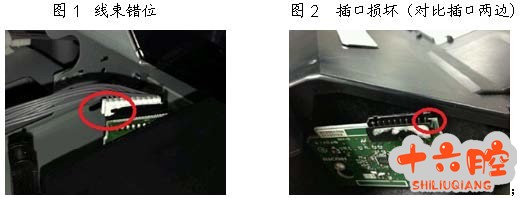
MP2352SP/DSM923SP Symptoms: 1. The machine enters the ready state slowly when turned on, and the main motor continues to rotate for about 2 minutes even when the machine is in the ready state (under normal circumstances, the main motor stops rotating before the machine enters the ready state and can be copied in about 20 seconds); 2. The machine presses the copy button after the main motor stops rotating, and the panel displays that it is copying, but the machine has no action. Reason: 1) Poor motherboard; 2) Poor contact of laser unit wiring harness; Maintenance process: On-site maintenance measures: 1) Replace the machine motherboard, but the fault persists; 2) Check the laser unit wiring harness and find that the wiring harness plug is misplaced. Reinstall the wiring harness and test the machine normally. As shown in the red circle in the figure:
Solution: Correctly install the wiring harness, eliminate the fault, and test the machine normally. |
Address of this article:https://073868.com/post/3266.html
Copyright Notice:
For relevant infringements, reports, complaints and suggestions, please send E-mail:weixiuwang68@qq.com
Tags: #2352 #3352 #2852 #Laser Unit #Motherboard







