
|
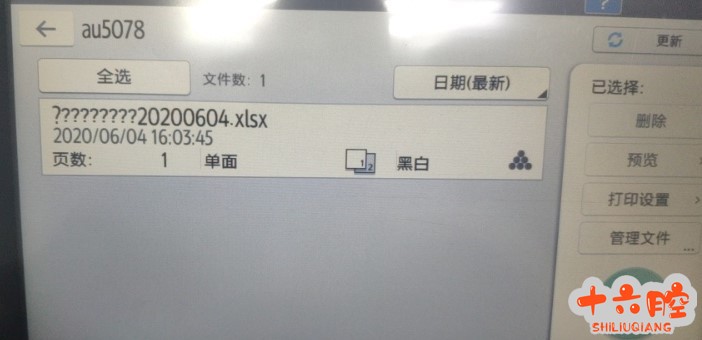
Symptoms 1. One IMC3500 machine is unable to display Chinese file names in the print list, with normal display of numbers and English. Chinese printed documents are normal, and the fault display is as follows:; Fault photos:
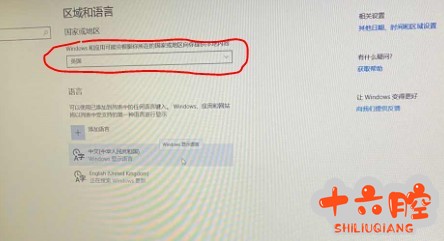
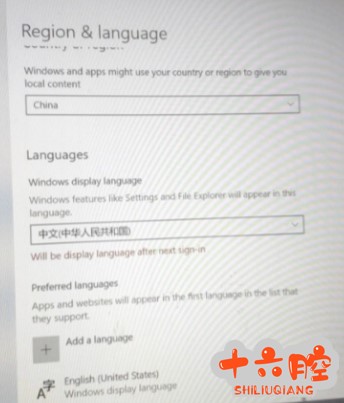
Possible causes: Print driver/guest operating system/machine firmware Maintenance process 1. On site inspection of the customer's operating system revealed that the customer is using Windows 10 Enterprise English version system with PCL6 English driver; 2. During the printing test, it was confirmed that the Chinese and English output of the printed document was normal, but the Chinese name of the document could not be displayed in the machine's printing list. The numbers and English names were displayed normally in the document; 3. Changing the print driver to PCL6 Chinese version/PostScript3 Driver Chinese version/PCL6 Driver for Universal Print Chinese version/PCL6 V4 Driver for Universal Print Chinese version cannot solve the problem;; 4. Use the latest PKG firmware package to upgrade the machine's firmware, and the fault persists even after the upgrade; 5. Check the operating system status of the customer's machine. After inspection, it was found that the country of use for the operating system level used by the customer is the United Kingdom. After changing the country to China, print and test again, but the fault still persists;
6. After changing the time zone of the customer's system to "Beijing/Shanghai/Hong Kong" and adding the system text to "Chinese", the Chinese display in the print list was normal after printing again. However, only the PCL6 V4 Driver for Universal Print driver can print Chinese documents to display normally, and PCL6 and PCL6 Driver for Universal Print are still garbled;
Solution Resolve the issue by changing the print driver and adjusting the client's computer operating system language and country; |
Address of this article:https://073868.com/post/3156.html
Copyright Notice:
For relevant infringements, reports, complaints and suggestions, please send E-mail:weixiuwang68@qq.com
Tags: #Garbled text #Drive #3500 #3000 #System






