
|
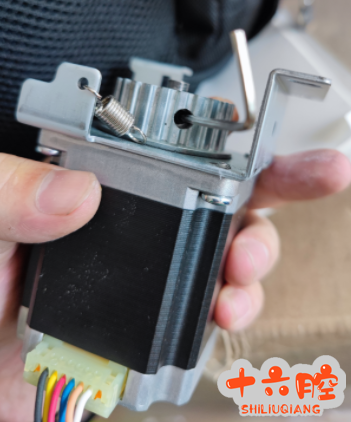
Symptoms In the DD3344C printing job, when 5-6 sheets are fed in each time, sometimes 3-4 sheets are printed. The job stops and reports a "B" position paper jam error, and there is no paper jam in the machine's paper path. Fault Analysis 1. By testing with different printing speeds, it was found that paper jams are unlikely to occur at the lowest printing speed. However, when set to standard speed or above, the above-mentioned faults will occur. When inspecting the drum, it was found that the drum gear and main gear were worn, and it is suspected that the high-speed operation of the drum may affect the feeding timing. 3. Replace the drum for testing, eliminate the paper jam phenomenon, and the machine runs normally. Solution Replace the drum gear and main gear. Another case: 3344 sudden paper jam during normal use. Every time it gets stuck in the right position. The paper gets stuck halfway through. Cleaning the paper roller and separation pad is ineffective. Trying to replace the paper roller and separation pad with a new one is also ineffective. Enter SP mode to test the 4-41 alignment sensor, it works normally, and the sensor is ruled out. Use SP mode to output the test motor. The main motor and feed clutch are working properly. When testing the alignment motor 5-044, there is an abnormal friction sound. Reduce the speed to 30rpm and test again, the abnormal noise is more pronounced. Determine the fault of the alignment motor or alignment roller. Remove the alignment motor and find that the motor drives the gear friction motor iron plate. Reinstall the drive gear. Machine testing. The machine has returned to normal.
|
Address of this article:https://073868.com/post/310.html
Copyright Notice:
For relevant infringements, reports, complaints and suggestions, please send E-mail:weixiuwang68@qq.com
Tags: #3344C #Paper jam #B-position cardboard #Drum






