
|
A newly installed M2701 machine has a problem with printing white stripes, which can occur in both printing and copying; Fault sample photo:
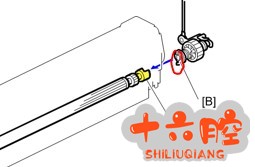
Possible causes: Drum failure/development failure/transfer failure/MBU failure Maintenance process 1. A white stripe fault occurred during the installation of the new machine. It was confirmed on site that both printing and copying were possible. The white stripe on the faulty sample had obvious periodicity. Based on the cycle distance, it was determined that the fault was caused by the developing roller or transfer roller; 2. Replacing the transfer unit is ineffective; 3. Replacing the developing unit is ineffective; 4. Check that the developing bias voltage value of SP5-804-008 is -520V, which is normal; 5. Replacing the PCDU unit is ineffective; 6. Replace MBU, ineffective; 7. Check the developing bias power supply interface of the machine and find that the developing power supply interface of the rack is recessed. Manually adjust the spring and repair it;
|
Address of this article:https://073868.com/post/3012.html
Copyright Notice:
For relevant infringements, reports, complaints and suggestions, please send E-mail:weixiuwang68@qq.com
Tags: #2701 #White slip #Developing #Transfer printing






