
|
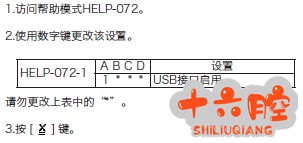
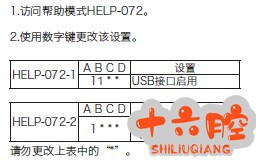
Symptoms DD5440C the machine is normal after installing the USB printing card. After installing the network (NIC) printing card, the boot display is normal. When clicking "Network Settings" in "User Tools", the machine restarts, resulting in the network card cannot be used. Maintenance steps 1. Check the network printing card wiring and connection plug, no short circuit or abnormal connection. 2. Replace the new network printing card and install it to this machine. The fault remains. 3. replace the printer motherboard, fault still. 4. After inquiring about the maintenance manual, it is found that if the USB printing card has been installed before this machine, there are differences in the setting when installing the network printing card later. See the following for details: 1) Settings just after installing the USB print card separately
2) After installing the USB printing card, install the network printing card and set it up
Solution: If the network printing card is installed after the USB printing card is installed, please follow the above step 4 to solve the problem. |
Address of this article:https://073868.com/post/2927.html
Copyright Notice:
For relevant infringements, reports, complaints and suggestions, please send E-mail:weixiuwang68@qq.com
Tags: #USB #Print Card #5440C #5454c







