
|
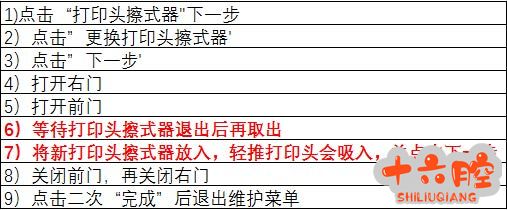
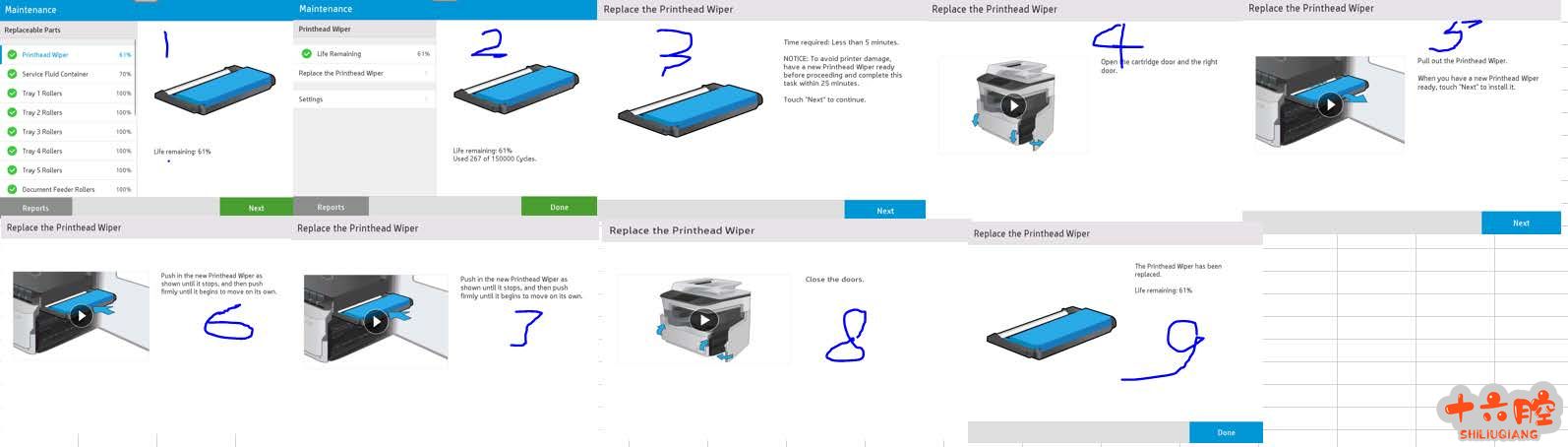
Reported event code: 61.C5.21 and related faults, the print head wiper motor stopped running during the replacement process of the print head wiper Single function machine HP PageWide Pro 750dw HP PageWide Pro 750dn HP PageWide Pro P75050dw HP PageWide Pro P75050dn Multifunction machine HP PageWide Pro MFP 772dw HP PageWide Pro MFP 772dn HP PageWide Pro MFP 772zs HP PageWide Pro MFP 777z HP PageWide Pro MFP777zhc HP PageWide Pro MFP P77740z HP PageWide Pro MFP P77740zs HP PageWide Pro MFP P77750z HP PageWide Pro MFP P77750zs HP PageWide Pro MFP P77760z HP PageWide Pro MFP P77760zs After manually pulling out the print head eraser, it cannot be reinstalled normally Attention: The print head wiper and ink collector must be replaced through menu operation when turned on
1. The print head wiper is the only long-lasting spare part that can be replaced under firmware control During the replacement process, it may cause damage to the wiping device 3. This means that the driving gears on both sides of the wiper may break teeth 4. Damaged print head wipers can shorten their lifespan 5. The printer will drive the print head wiper to move to the right to detect the use of the wiper and rotate the cleaning cloth to move forward 6. Damaged wipers cannot move to the right and will stop prematurely In this case, the printer will prompt a message: The print head wiper has been used up and must be replaced If the wiper is damaged, the engineer needs to open the ink access cover and manually drive (T20) to remove the wiper from the right door. This is a bit laborious. a) After dismantling, you need to manually install the wiper and drive it back to its original position. Or turn on the printer and reinstall the wiper according to the instructions. When removing/installing the wiper, it is recommended to run the print head wiper diagnostic function under the service menu. |
Address of this article:https://073868.com/post/2818.html
Copyright Notice:
For relevant infringements, reports, complaints and suggestions, please send E-mail:weixiuwang68@qq.com







