
|
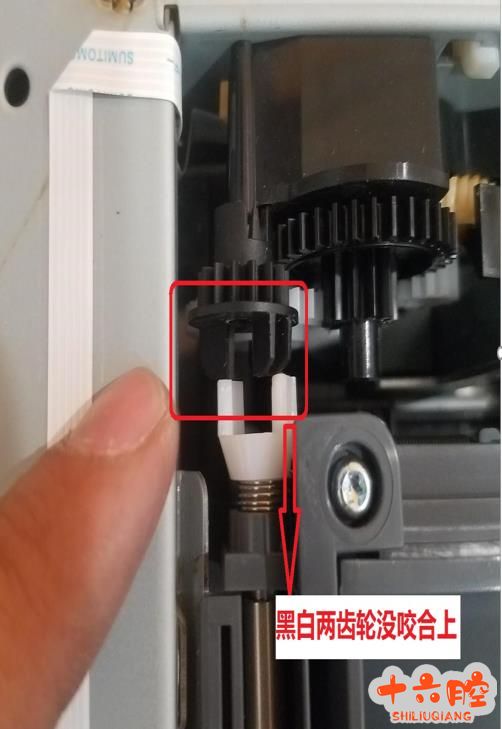
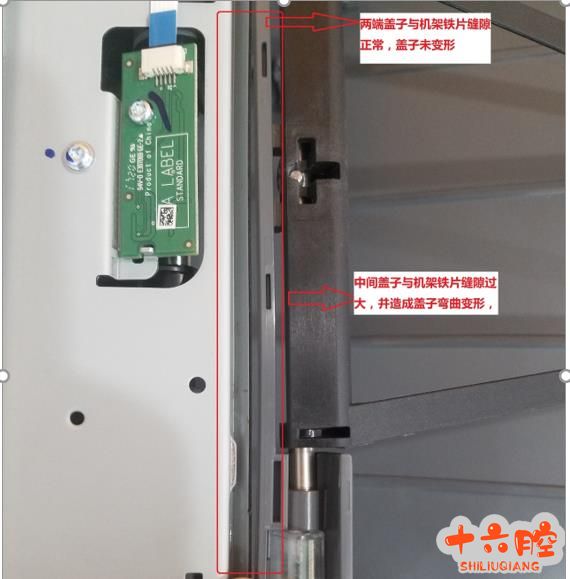
HP PageWide Pro 750dw HP PageWide Pro 750dn HP PageWide Pro P75050dw HP PageWide Pro P75050dn Multifunction machine HP PageWide Pro MFP 772dw HP PageWide Pro MFP 772dn HP PageWide Pro MFP 772zs HP PageWide Pro MFP 777z HP PageWide Pro MFP777zhc HP PageWide Pro MFP P77740z HP PageWide Pro MFP P77740zs HP PageWide Pro MFP P77750z HP PageWide Pro MFP P77750zs HP PageWide Pro MFP P77760z HP PageWide Pro MFP P77760zs Event code: 61.B9.21 STACK CONTROL MOTOR STOP Fig. 1 Gear not properly engaged; Figure 2 The position of the finger is not correctly pointed to the groove, forming pressure and causing deformation. The gear is driven by the print head lifting motor, and the gear is driven to rotate during the print head lifting process. The gear then drives the iron shaft in Figure 2 to rotate to achieve the effect of sensor inspection.
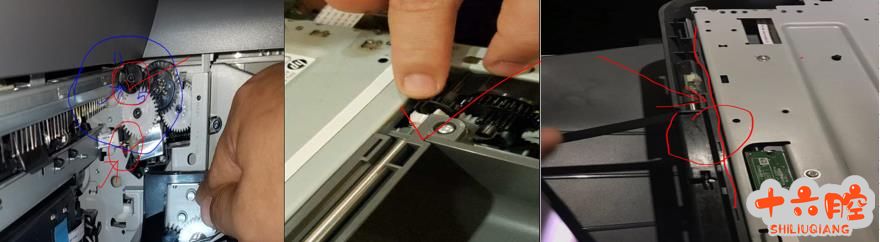
1) Remove all paper or obstructions from the paper path. 2) Ensure that the paper loaded in the specified tray is supported. 3) From the Service/Advanced Service/Component Test menu, run the specified motor test (forward and reverse) accordingly. If the error persists, replace the specified motor assembly. 4) Inspect the connection components (shafts, drive belts, gears, bearings, etc.) for physical damage that may prevent the motor from turning. 5) Confirm that the meshing gear in the figure below is in the direction of 11 o'clock and 5 o'clock. Only in this direction can the paper outlet tray be loaded and the gear in the figure below can be meshed normally. (Figure 1 and 2 below) And confirm that the paper tray is correctly loaded and correctly slotted. (Figure 3 below)
|
Address of this article:https://073868.com/post/2819.html
Copyright Notice:
For relevant infringements, reports, complaints and suggestions, please send E-mail:weixiuwang68@qq.com







