
|
Fault Description The customer reported a malfunction where the control panel did not respond (the device froze or hung up) when the device was awakened from "energy-saving" mode (i.e. deep sleep mode). The "energy-saving" mode is the default setting of the printer, but it can be changed in the "Settings" - "Power Management" section of EWS. Note: This document is only intended for situations where there is no response when waking up from deep sleep mode. Customers may encounter the following situations:
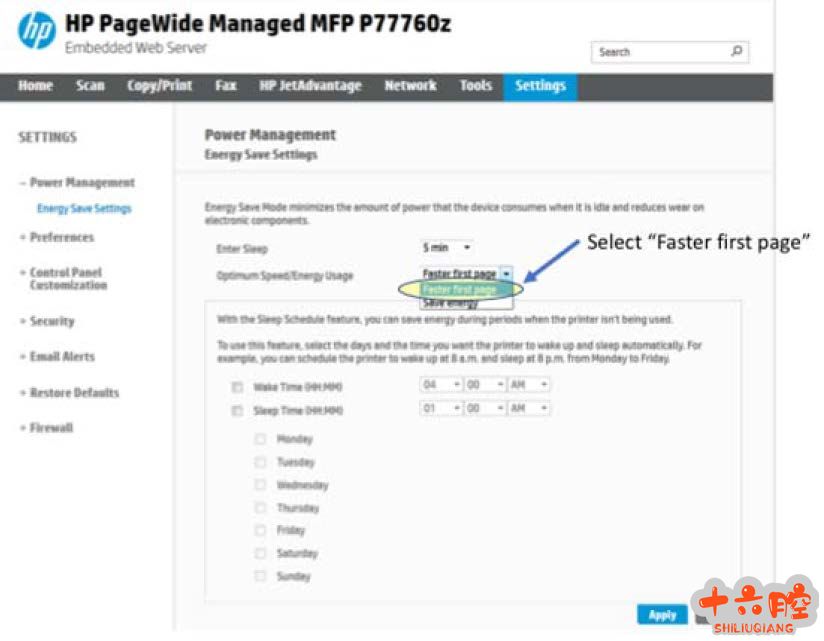
Affected devices The products listed in the table are within the affected range. Single function machine HP PageWide Pro 750dw HP PageWide Pro 750dn HP PageWide Pro P75050dw HP PageWide Pro P75050dn Multifunction machine HP PageWide Pro MFP 772dw HP PageWide Pro MFP 772dn HP PageWide Pro MFP 772zs HP PageWide Pro MFP 777z HP PageWide Pro MFP777zhc HP PageWide Pro MFP P77740z HP PageWide Pro MFP P77740zs HP PageWide Pro MFP P77750z HP PageWide Pro MFP P77750zs HP PageWide Pro MFP P77760z HP PageWide Pro MFP P77760zs Solution When the printer is unresponsive, unplug the power cord, wait for 10 seconds, then plug in the power cord and turn on the printer to enter normal mode ready. When the printer is working properly, using any of the following options can solve this problem, either one or both options can be used. Option 1: Disable energy-saving mode in EWS Enable the 'Faster First Page' feature, which requires firmware version 1728L. Once this feature is enabled, the printer will no longer enter power-saving mode and there will be no potential for error messages. This option is the best option, especially when option 2 has not been deployed yet. Note: This option requires firmware version 1728L. The following steps can disable energy-saving mode in EWS Firstly, you need to obtain the IP address of the printer. You can find the network and IP address on the control panel. 1. On a PC or mobile device connected to the same network, use a browser and enter the printer's IP address to open EWS. On the EWS page, click on Settings, and then select Power Management from the left navigation bar. 3. Click on energy-saving settings. 4. In the Optimal Speed/Energy Usage drop-down menu, select Faster First Page, then click Apply to save the settings.
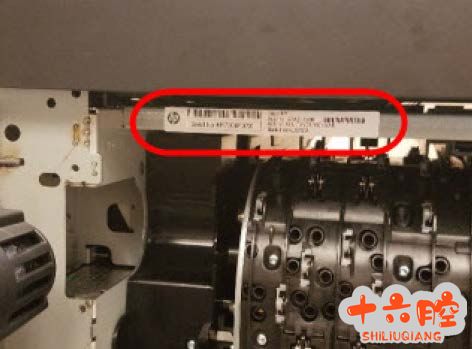
Option 2: Replace the motherboard The design change of the motherboard can solve the above-mentioned problem. The new motherboard has been used in factories and service spare parts since August 2, 2017. The engine serial number for the printer to enable the new motherboard is "MY787CG00P" or later. Note: The above mentioned is the engine serial number, not the printer serial number. You can open the left compartment door and see the engine serial number in the upper left corner. Position of engine serial number
|
Address of this article:https://073868.com/post/2817.html
Copyright Notice:
For relevant infringements, reports, complaints and suggestions, please send E-mail:weixiuwang68@qq.com







