
|
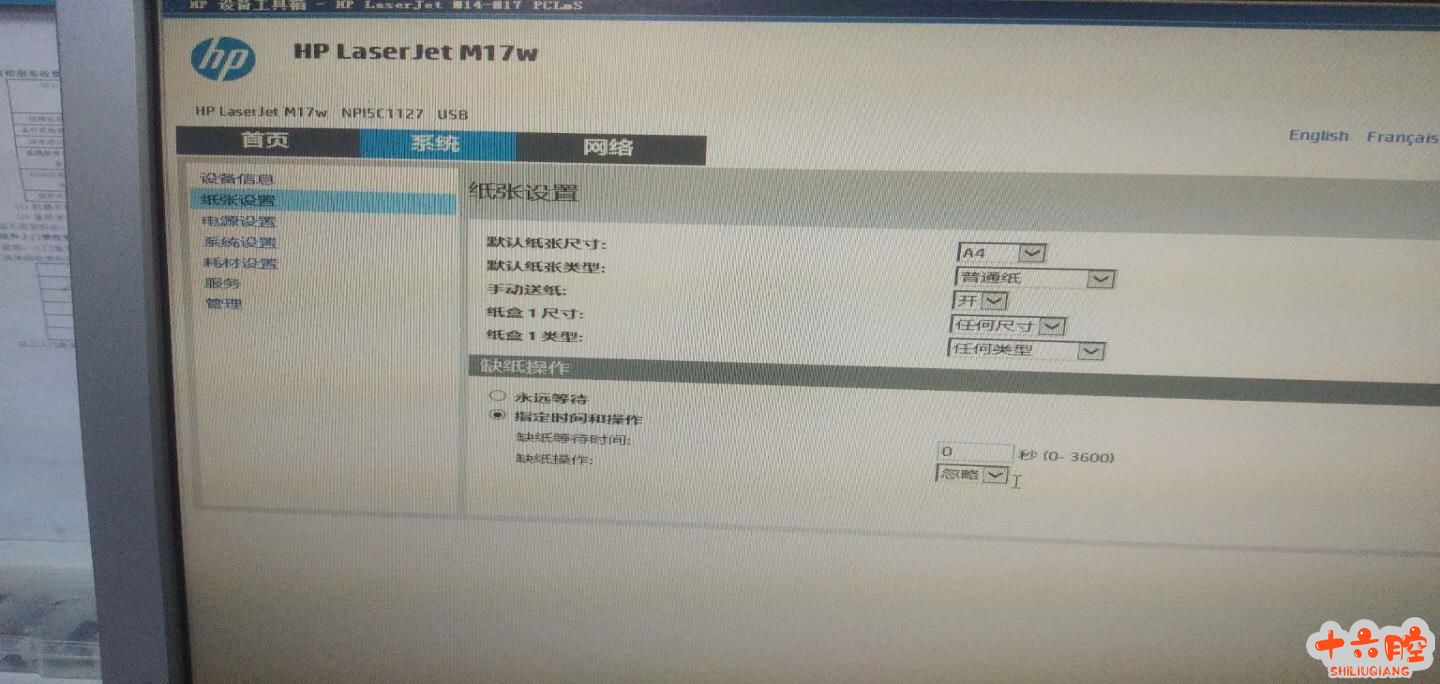
Fault Description: Wireless direct printing on mobile phone, yellow exclamation mark flashing on the machine, and paper shortage displayed on the phone. Resolution process: An M17W machine reports a paper shortage when it switches to wireless printing and requires manual paper feeding before it can be printed. On site, the direct connection test with the mobile phone was indeed as the user claimed, suspecting that there was a problem with the sensor, but no issues were found during the inspection. But later it was normal to print online with a computer, and then the fault was reproduced by printing the configuration report page offline. Because online printing on a computer is normal, we are considering whether it is due to software issues. First did NVRAM initialization 1) Shut down, press and hold the 'continue' button 2) Turn on the printer and continue holding down the 'Continue' button for approximately 20 seconds, then release it when the ready light comes on. The printer will perform the NVRAM initialization process. After initialization, the fault persists. Continuing with the firmware upgrade, its firmware was already the latest, so a firmware upgrade was made for the cooling mode, upgrading to version 12440. The problem is still unresolved. I checked the paper settings in EWS and found that the default for paper shortage operation is to wait forever. I changed it to ignore and the problem was resolved.
Share summary: For models that only have buttons and indicator lights, it is best to install a fully functional driver. 2. In the absence of hardware failure, if initialization and firmware upgrade are ineffective. Consider whether there is a problem with the setting. |
Address of this article:https://073868.com/post/2787.html
Copyright Notice:
For relevant infringements, reports, complaints and suggestions, please send E-mail:weixiuwang68@qq.com
Tags: #M17w #Wireless Printing #Out of paper #NVRAM







