
|
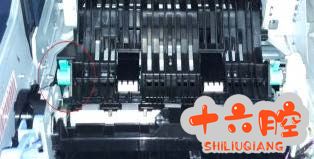
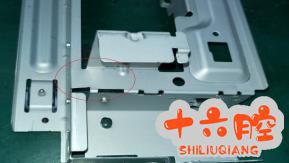
Fault Description: Customer warranty M551dn, paper box 2 paper feed printing A4 paper upper right corner Resolution process: First replace the new unpacking paper, 80g paper test, the fault is the same, eliminate the media. Open the right door, insert the right door detection sensor into the paper, close the secondary transfer assembly, print test, and observe where the paper comes from the paper box 2 and is folded. It was found that the paper was angled before reaching the registration assembly, indicating that the paper path before the registration assembly was faulty. For the components before the registration component, only the paper feed component of the paper box 2 and the paper pickup component, the paper pickup component generally does not cause a corner fold, that is only the paper feed component of the paper box 2 has a problem, and the failure remains after the paper feed component is replaced by the disassembling machine. Continue to investigate the problem. When disassembling and assembling the paper feed assembly of the paper box 2, it was found that the buckle on the left side was extremely tight. It took a lot of force to release the buckle, such as (Figure 2) the buckle at the red circle. Eliminate the damage of the buckle due to the replacement of new spare parts. Continue to disassemble all the frames related to the paper feeding assembly of the paper box 2, and finally find the deformation in the place (fig. 3). here is a corner support frame of the paper feeding assembly of the paper box 2. after manual adjustment and flattening, install the paper for testing, and print everything is normal. Troubleshooting.
|

Address of this article:https://073868.com/post/2786.html
Copyright Notice:
For relevant infringements, reports, complaints and suggestions, please send E-mail:weixiuwang68@qq.com
Tags: #M551dn #Tray 2 #M551 #Upper right corner






