
|
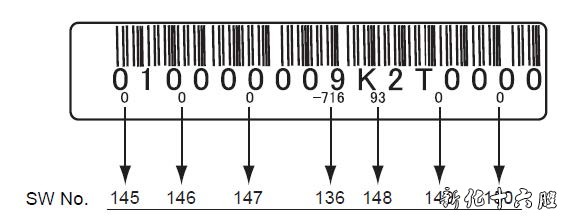
After replacing the laser assembly on iR 2545 series machines, enter the laser label value. After replacing the laser assembly, you need to enter the parameter values from the label on the replaced laser assembly in the following maintenance mode.
Enter the maintenance mode and select the following adjustment items: PRINT > Bitswitch > 136 laser horizontal scanning direction write position adjustment (A) PRINT > Bitswitch > 145 laser horizontal scanning direction magnification adjustment (A-B) PRINT > Bitswitch > 146 laser horizontal scanning direction magnification adjustment (A-C) PRINT > Bitswitch > 147 laser horizontal scanning direction magnification adjustment (A-D) PRINT > Bitswitch > 148 laser horizontal scanning direction write position adjustment (A-B) PRINT > Bitswitch > 149 laser horizontal scanning direction write position adjustment (A-C) PRINT > Bitswitch > 150 laser horizontal scanning direction write position adjustment (A-D) Enter the laser tag value after replacing the laser assembly: 1. When a positive number is entered, add 1,000 to the number of labels at the corresponding position. For example, if the "148" position is 93, enter 1,093(1000 93); 2. When entering a negative number: 1,000 minus the number of labels at the corresponding position, for example, if the "136" position is -716, enter 284(1,000-716); |
Address of this article:https://073868.com/post/2612.html
Copyright Notice:
For relevant infringements, reports, complaints and suggestions, please send E-mail:weixiuwang68@qq.com







