
|
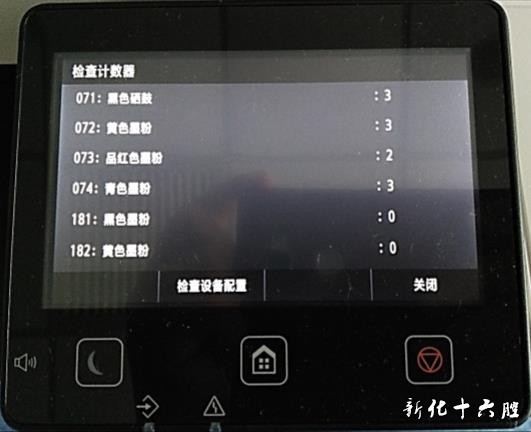
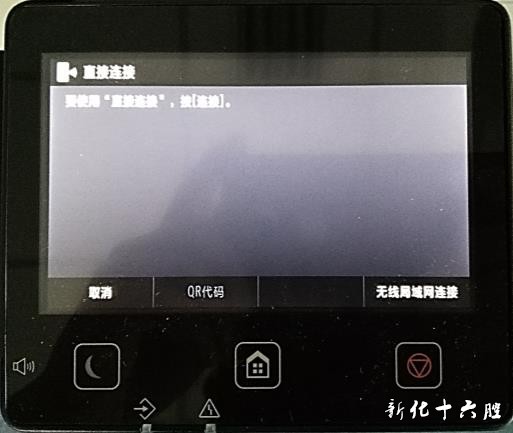
[Detailed Description] 1) When viewing the "Counter Status" in user mode, it is found that the text description "Black Toner" after the "071" counter is incorrectly displayed as "Black Toner Cartridge". Such as (Figure 1) 2) When using the "Direct Connection" function in user mode, it was found that the text description "Connection" on the button was incorrectly displayed as "Cancel". Such as (Figure 2) 3) After switching the user interface of the compound machine to English, check the above content again and confirm that the English expression of the content is normal.
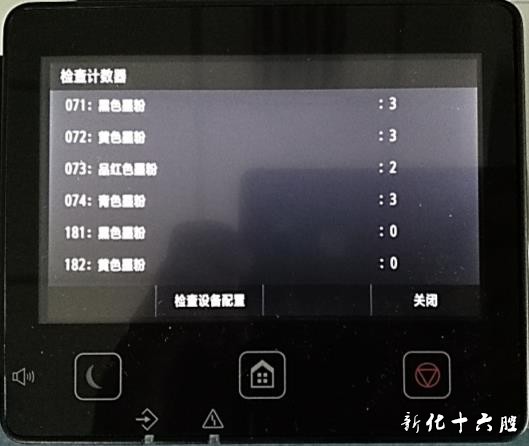
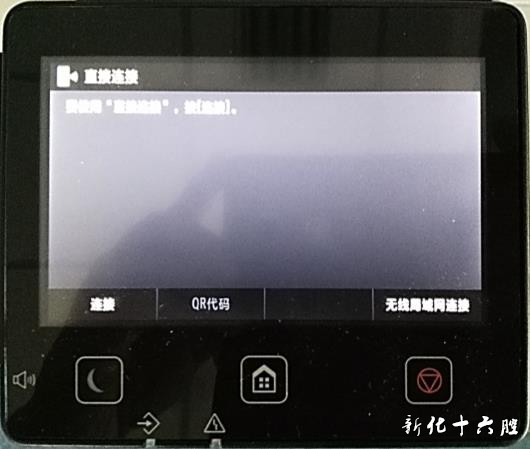
[Cause of Failure] An error in the process of language information conversion leads to the above failure. The system firmware version of the MFP needs to be updated. [Maintenance measures] 1) When viewing the "counter status" in user mode, it is found that the text description "black toner" after the "071" counter is incorrectly displayed as the "black toner cartridge" fault. After updating the system firmware of the multifunction machine to the following version, the display content Return to normal. (as shown in Figure 3) Main Controller:Ver.02.18 Language:Ver.02.06 2) When using the "direct connection" function in user mode, it is found that the text description "connection" on the button is incorrectly displayed as "cancel". After updating the system firmware of the multifunction machine to the following version, the display content returns to normal. (As Figure 4) Main Controller:Ver.02.19 Language:Ver.02.07
|
Address of this article:https://073868.com/post/2611.html
Copyright Notice:
For relevant infringements, reports, complaints and suggestions, please send E-mail:weixiuwang68@qq.com
Tags: #c3020 #Text error







