
|
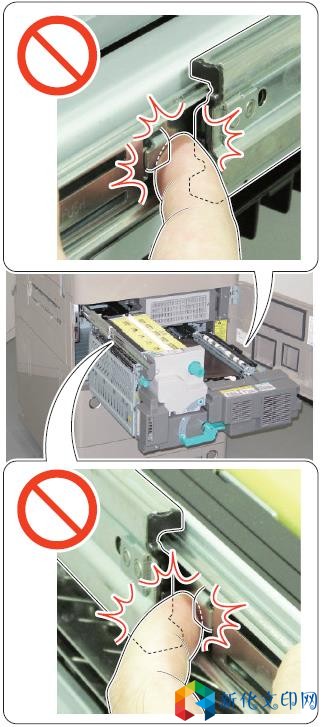
Reason When pushing the fixing component along the slide rail, extra caution is required as fingers may be caught by the lock of the rail. Please follow the steps below to push the fixing unit in. ImageRUNNER ADVANCE 6075/6065/6055 series ImageRUNNER ADVANCE 6275/6265/6255 series ImageRUNNER ADVANCE 6575/6565/6555 series Detailed description Attention: When pushing in the fixing component and pressing the release spring, slowly push the fixed feed device so that your fingers are not caught.
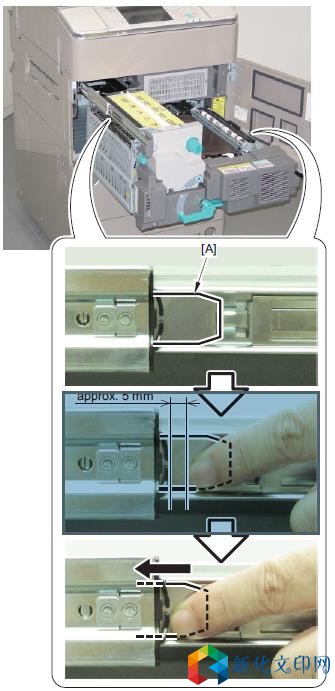
How to push in the fixing unit 1. Press the release springs [A] on both sides of the two steel rails with your hand to release them. After pressing the release spring, slowly advance the fixing component unit by about 5 millimeters while keeping it level.
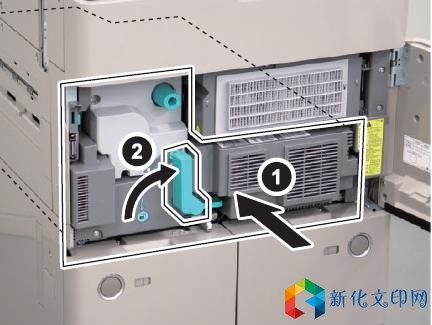
2. Release your fingers from the release spring and slowly push the fixing component unit into the end
|
Address of this article:https://073868.com/post/2571.html
Copyright Notice:
For relevant infringements, reports, complaints and suggestions, please send E-mail:weixiuwang68@qq.com






