
|
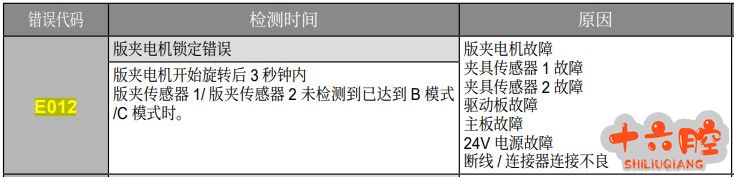
Symptoms: E012 fault occurs when the machine is turned on. Maintenance process: 1. Query manual E012 indicates that the clamp motor is locked incorrectly;
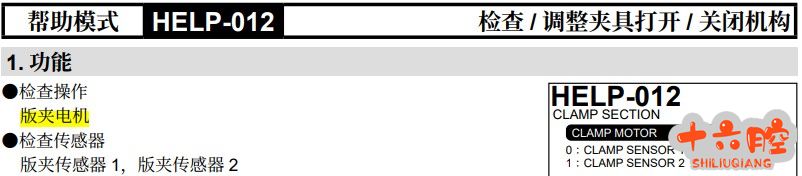
2. Tested using the HELP-012 code, both the clamp motor and clamp sensor 1/2 are functioning properly;
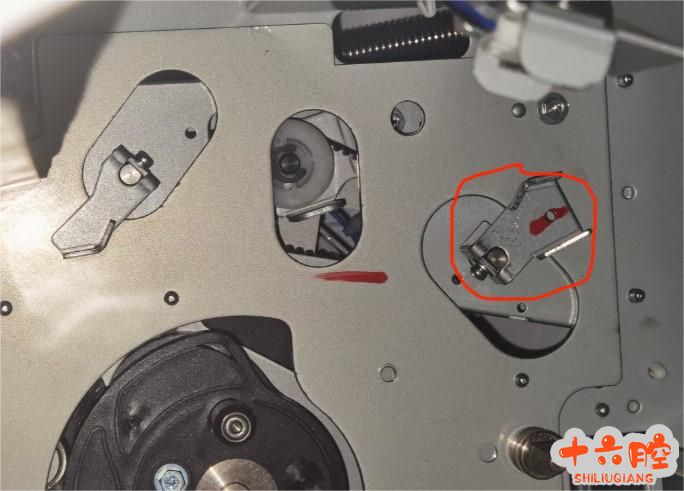
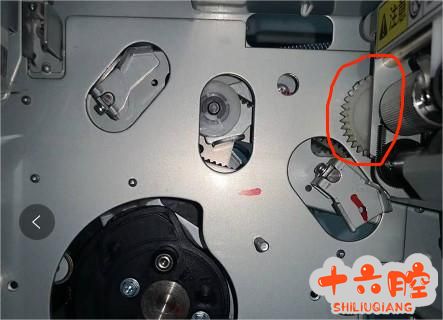
3. After opening the right side unloading unit, it was found that the unloading side clamp opening/closing lever was deformed;
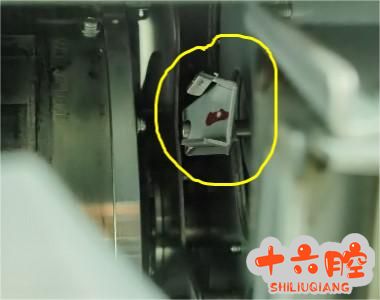
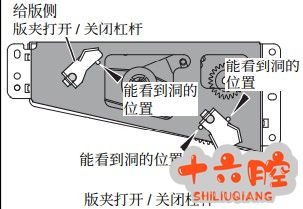
The position of the lever for opening/closing the clamp in this picture is abnormal 4. After correcting the deformed lever bracket, there was an abnormal noise when the machine was turned on, and the E012 code appeared again. Upon inspection, it was found that the iron bracket had deformed again. This bracket collided with the transmission gear of the unloading unit, causing it to deform again;
Unloading unit gear that collided This picture shows the accurate original position of the clamp opening/closing lever 5. The opening/closing lever of the plate clamp unit was found to be in the wrong position, resulting in collision with the unloading gear during operation; 6. Disassemble the plate clamp unit and align the opening/closing lever of the plate clamp again according to the three alignment holes indicated by the red arrows in the following figure;
7. After repositioning the lever for opening/closing the clamp, reinstall the clamp unit and test the machine to restore normal operation upon startup; Solution The lever for opening/closing the clamp is abnormal in its original position, causing the machine to experience E012 malfunction. |
Address of this article:https://073868.com/post/152.html
Copyright Notice:
For relevant infringements, reports, complaints and suggestions, please send E-mail:weixiuwang68@qq.com







