
|
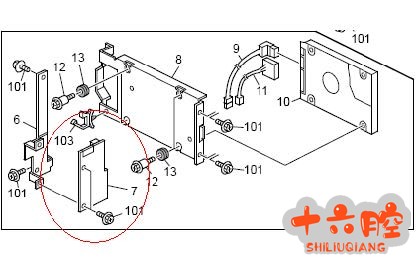
Start up report sc819 code. Diagnostic process 1) Search for maintenance manual SC819 code comments: 2) Replace the controller board, but the fault persists. 3) It can be inferred that the poor connection between the controller board, IPU board, and BCU caused the malfunction. 4) Check the connections between the boards and reinstall them, but the fault persists. 5) After replacing the hard drive interface board, the problem was resolved. Solution The fault was resolved after replacing the hard disk interface board (part 7 in the figure below).
|
Address of this article:https://073868.com/post/1374.html
Copyright Notice:
For relevant infringements, reports, complaints and suggestions, please send E-mail:weixiuwang68@qq.com







