
|
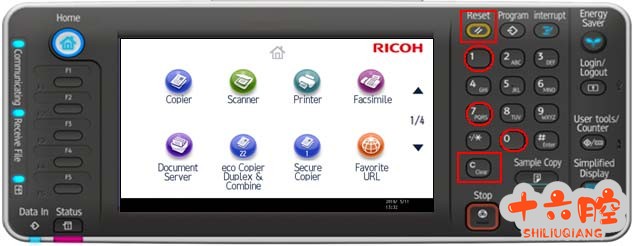
Symptoms After updating the interface, the device cannot enter maintenance mode. Reason The device interface and buttons have been modified, and the way to enter maintenance mode is slightly different from before. Solution
1. Press the Reset button. 2. Press the number key "107". Press and hold the C button for more than 3 seconds. (Note: This is not the previous red Stop button). 4. Enter maintenance mode. |
Address of this article:https://073868.com/post/1371.html
Copyright Notice:
For relevant infringements, reports, complaints and suggestions, please send E-mail:weixiuwang68@qq.com
Tags: #Maintenance mode #4002 #7502 #9002 #5002







