
|
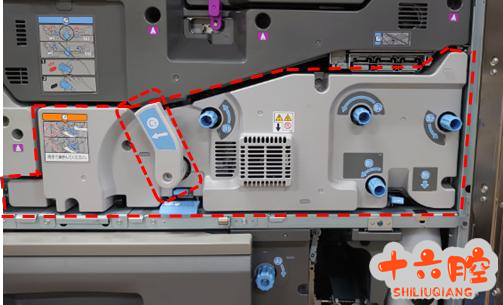
Symptoms J45 appeared, and when the Z2 guide plate was opened to clear the paper jam, it got stuck on the double-sided conveyor roller 4. Reason The drive belt of double-sided conveyor motor 2 is loose. Solution Use the following procedure to tighten the drive belt. 16. Remove the right inner cover of the drawer unit.
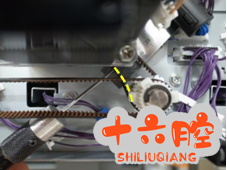
17. Check the tension of the drive belt of the double-sided conveyor motor 2.
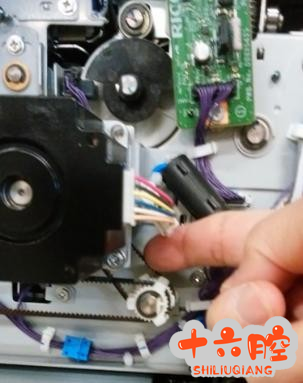
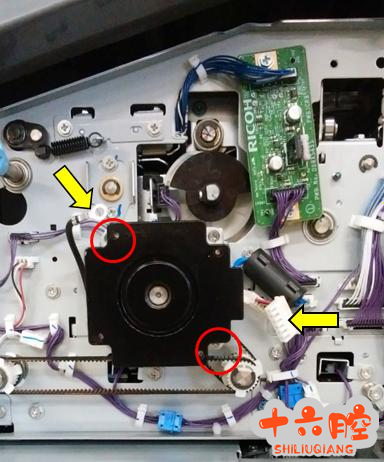
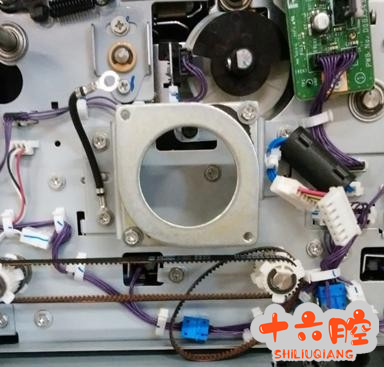
As shown in the figure, use the tip of a screwdriver to push the belt. If the tension is too loose, please continue. Otherwise, stop the process. 18. Disconnect the motor harness and remove the two screws (red circles) and the motor.
19. Loosen the two screws (red circles) that secure the damper. 20. Move the damper slightly to the upper left in the direction indicated in yellow, and then tighten the screw.
21. Reconnect the motor and check the belt tension again. If the tension is still too loose, please readjust the position of the damper. 23. Reinstall the inner cover of the drawer unit. |
Address of this article:https://073868.com/post/1347.html
Copyright Notice:
For relevant infringements, reports, complaints and suggestions, please send E-mail:weixiuwang68@qq.com






