SymptomsWhen the customer conducted a security scan on the network, they found that RicohMFPThe machine is turned on2049Port, but on the machine'sWebNo relevant settings were found on the page. Maintenance processIn the smart panel andMFPThe controller used some ports for communication and opened them to the external network, resulting in warnings during security scanning. For security reasons, these ports can be closed.
The ports used include:- 111/tcp- 1022/tcp- 1023/tcp- 2049/tcp- 18315/tcp- 54080/tcp- 54443/tcp- 65000/tcp1- 65001/tcp1- 111/udp1,2- 1022/udp- 1023/udp1 These ports are expected to be repaired in future firmware;2 Port111/udp Currently appearing in the following models:D219/D220/D214/D196/D236, D259, M0B0/D0A0
To close these ports, it is necessary to confirm and upgrade the firmware;
Phase 1
Phase 2
Model M0B1/M0B2
Network Support v17.21
Fix not required. Ports 111(UDP), 65000(TCP), and 65001(TCP) are already closed.
Model D0BX/D0BY/D0BZ
Fix implemented from 1st mass production.
Network Support v17.29
Model M0CL/M0CM
Fix implemented from 1st mass production.
Network Support v17.29
Model D255/D256
Network Support v15.67
Network Support v15.67
Model D0BT/D0BV/D0BW
Fix implemented from 1st mass production.
Fix implemented from 1st mass production.
Model D0B4
Fix implemented from 1st mass production.
CTL System v1.04
Model D257/D258
Network Support v16.53
Network Support v16.54
Model D260/D261
Network Support v16.53
Network Support v16.54
Model D0CM/D0CN
Fix implemented from 1st mass production.
Fix implemented from 1st mass production.
Model D0CP/D0CQ
Fix implemented from 1st mass production.
Fix implemented from 1st mass production.
Model D0C5/D0C6/D0C4/D0AP
Network Support v17.28
Network Support v17.28
Model D284/D290/D285/D291/D286/D292/D287/D293/D288/D294/D289/D295
Network Support v16.54
Network Support v16.54
Model M0AN
TBD
TBD
Model M0A0
Network Support v16.39
Network Support v16.39
Model D219/D220/D214/D196/D236
Network Support v15.32.1
Network Support v15.32.1
Model D298/D297/D299/D296
Network Support v16.60
Network Support v16.61
Model D0CA/D0C9/D0C8/D0CB
Fix implemented from 1st mass production.
Fix implemented from 1st mass production.
Model D259
Network Support v15.46.1
Network Support v15.46.1
Model D223/D224/D225
Network Support v16.43
Network Support v16.44
Model D238/D239/D240/D241/D242/D243/D244
Network Support v15.73
Network Support v15.76
Model D0AC/D0AS/D0AD/D0AT/D0AH/D0AX/D0AJ/D0AY/D0AE/D0AV/D0AF/D0AG/D0AW
Network Support v15.72
Network Support v15.75
Model D0BL/D0BM/D0BJ/D0BK/D0BN/D0BP/D0BQ/D0D7/D0D8
Package(ALL) v1.03.1
Package(ALL) v1.03.1
Model M0AJ/M0AL
Network Support v15.77
Network Support v15.77
Model D262
Network Support v15.31
TBD
Model D0A5/D0AK/D0AL/D0AM/D0BG
Network Support v17.22
Fix not required. Ports 111(UDP), 65000(TCP), and 65001(TCP) are already closed.
Model M0BH/M0BJ/M0BK/M0BL/M0CN
Network Support v17.21
Fix not required. Ports 111(UDP), 65000(TCP), and 65001(TCP) are already closed.
Model D0A0/D0AA/D0AB
CTL System v1.10
CTL System v1.10
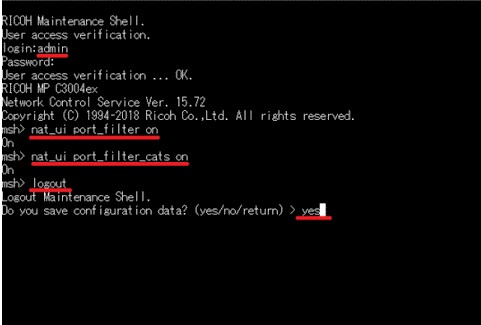
UsetelnetCommand to close the port;telnet machineipAddress;After logging in as an administrator, enter the following command:;nat_ui port_filter onnat_ui port_filter_cats off Note: This command is used to close18315/tcpPortlogout, inputyesExit system
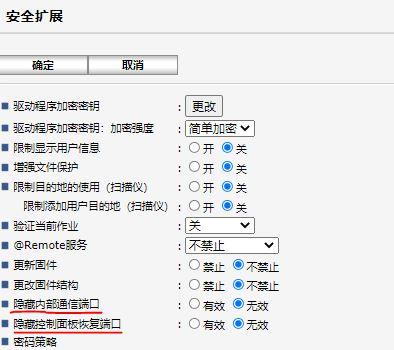
It can also be done inMFPSet up on the webpage.Will the following2The item is set to be valid.
Related models: Black&WhiteMultifunctionIM2500,3000,3500,4000,5000,6000IM2702IM430FIM7000,8000,9000MP305+SPMP2555SP,3055SP,3555SPMP4055SP,5055SP,6055SPMP6503SP,7503SP,9003SPColorMultifunctionIMC400FIMC2000,C2500IMC3000,C3500IMC4500,C6000IMC6500,C8000MC2001MPC406ZSPMPC407SPMPC2004SP,C2504SPMPC2004ex,C2504exMPC3004SP,C3504SPMPC3004ex,C3504exMPC4504SP,C6004SPMPC4504ex,C6004exMPC6503SP,C8003SPSPC360SFNw
5-804-001 paper feed motor 15-804-002 paper feed motor 25-804-003 paper feed motor 35-804-004 paper feed motor 45-804-005 hand feed paper feed clutch...
Q: One piece of original powder is printed less than 2 kilometers. When the machine is turned on, it is found that there is a lot of powder leakage on the transfer roller. After removing the development and cleaning ID sensor, will the 3103Vsp value 0.07 be too low and a large amount of powder will be added?...
A collection of firmware upgrade methods for all current Ricoh models. Note: No matter which of the following methods is used for firmware upgrade, do not shut down during the upgrade process, this operation will cause damage to the machine hardware. 2. A3 models firmware upgrade SD card production...
Ricoh copier basic principle, imaging principle and copier foundation, color basic principle 1, imaging principle and copier foundation 2, color basic principle 3, machine test sample printing 4, parts manual use training materials 5, dot map use method m...
Symptoms: Keith Deyer cp6303c Machine Printing Times Failure E-02 Causes: 1. Paper table motor problem and poor paper table drive; 2. The height sensor of the paper table and the lower limit sensor of the paper table are not good. 3. Bad motherboard. 4. Harness connection...
Issue: Exporting a profile configuration that contains a large number of workflows and groups does not start the download and cannot be displayed. Occurring condition: A user attempts to export a profile configuration that contains a large number of workflows and groups. Reason: Due to the group and work being processed...
Ricoh IM C320F_P C375_M C320FW Solution to Drum Unit Setting Error after Memory Clear Symptoms When Memory Clear: Clear All (SP:5-801-001) is performed, for example, due to forgetting to log on...