
|
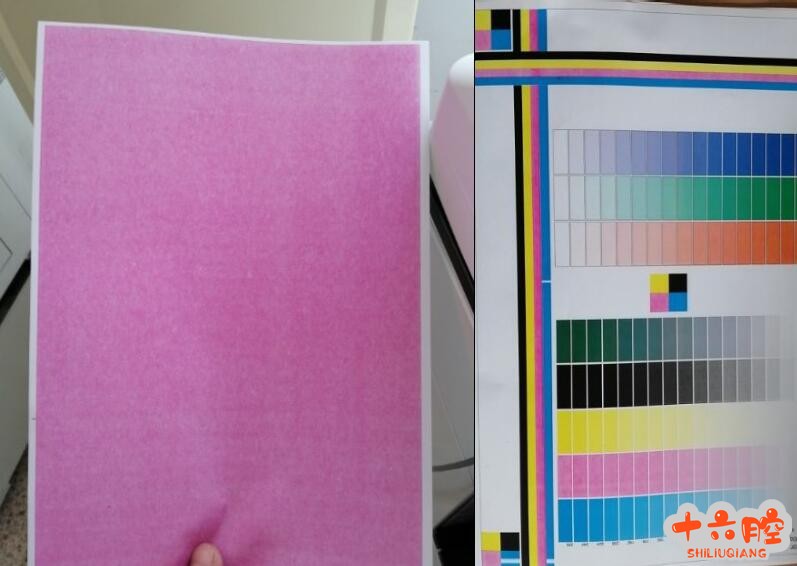
A MPC6004SP exhibits a pale magenta color during copying and printing; Fault proofs:
Possible causes: Color powder issue, PCDU issue, hopper issue, image transfer belt issue, LDU issue, and board path issue; Maintenance process 1. On site confirmation shows that this situation occurs in both printing and copying of the machine. When testing the SP2-109 sample image (as shown in the above figure), it was found that the overall magenta color is weak and the concentration is relatively light; 2. Check that both the gamma and Vt values of the magenta color of the machine are normal. Execute SP3-050 forced powder replenishment, but the effect has not improved,; 3. When manufacturing cardboard, the sample images on ITB and PCU showed that the magenta color density was relatively light. After replacing the magenta PCDU and color powder, the effect did not improve; 4. Replacing the ITB and LDU tests did not improve the results; 5. Check the hopper unit, normal, clean the magenta PCDU charging, no improvement in effect; 6. Replacing the IPU for testing did not improve the effect; 7. The high-voltage board was replaced and tested, but the effect did not improve; 8.Replace the image IOB, troubleshoot, and the effect is normal; |
Address of this article:https://073868.com/post/1214.html
Copyright Notice:
For relevant infringements, reports, complaints and suggestions, please send E-mail:weixiuwang68@qq.com






