
|
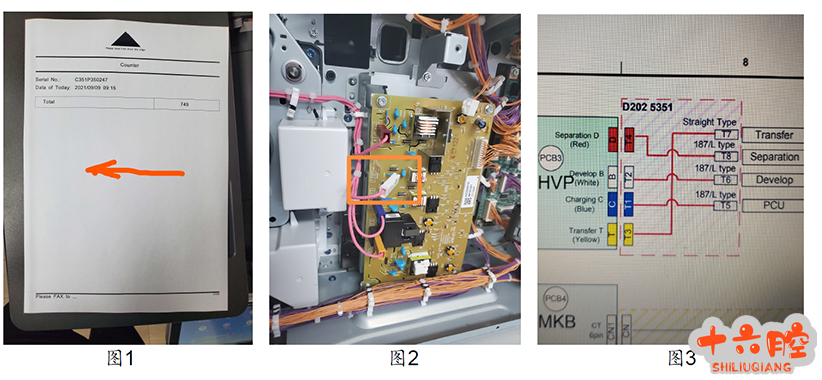
Symptoms When printing the counter page on the MP3055SP model after installation, there is a slight background dust on the full page. Maintenance process 1. Upon careful observation of the sample image, it was found that except for the area where the edge was removed at the top, there was slight bottom dust present in all other areas (with the top being more prominent). This type of malfunction is more likely caused by electrical contact issues. 2. The engineer replaced the PCDU unit on site, but the fault still persists. The image of the faulty machine's PCDU unit tested well on other machines, and based on this, the image unit problem has been ruled out 3. Check the contact points between the PCDU unit and the machine (charging, developing bias), and ensure good contact without any abnormalities. 4. Check the voltage contact point of the paper transfer roller and no abnormalities were found; Replace the transfer roller component, but the fault persists. [kkpay=4]5. Consider replacing the high-voltage board for testing. Upon opening the back cover, it was found that the T2 high-voltage terminal of the high-voltage board was not connected (Figure 2). After reconnecting, the fault was resolved. Check the point-to-point graph to confirm that T2 terminal is the developing bias terminal (Figure 3)
Solution: Reconnect the developing bias terminal (T2) on the high-voltage board[/kkpay] |
Address of this article:https://073868.com/post/1183.html
Copyright Notice:
For relevant infringements, reports, complaints and suggestions, please send E-mail:weixiuwang68@qq.com
Tags: #bottom ash #3055 #Charging #developing bias #High pressure plate






