
|
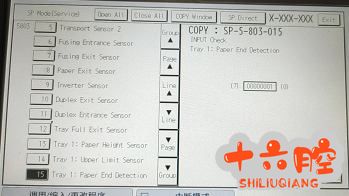
Phenomenon: Every time the first paper tray runs out of paper during printing, the machine will report a paper jam. At this time, there is no paper in the machine, and even when the paper tray runs out of paper, the machine panel still displays' paper ' (Paper tray 2 is normal) Maintenance process: 1. Suspect that the paperless detection probe has shifted, and check for no abnormalities 2. Input the paperless sensor (5-803-15) for inspection. Touching the probe with your hand or releasing the sensor will cause a response
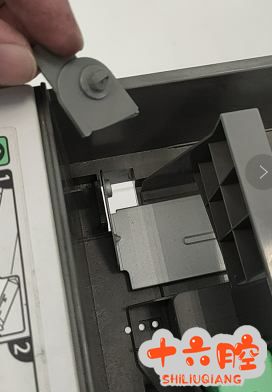
3. Remove the first paper path for inspection, and no abnormalities were found throughout 4. Use input check mode (5-803-15) again to check the sensor, this time without touching the probe by hand. But to test with or without paper in the paper tray. At this point, it was found that regardless of whether there was paper in the paper tray or not, the sensor reported the presence of paper. 5. Upon further inspection, it was found that the plastic support at the bottom shaft of the paper tray was broken. The position of the paper lifting bottom plate is not fixed during movement, causing the paperless detection probe to fail to fall into the opening properly. At this time, the machine will not detect that the paper tray is paperless.
|
Address of this article:https://073868.com/post/986.html
Copyright Notice:
For relevant infringements, reports, complaints and suggestions, please send E-mail:weixiuwang68@qq.com






