
|
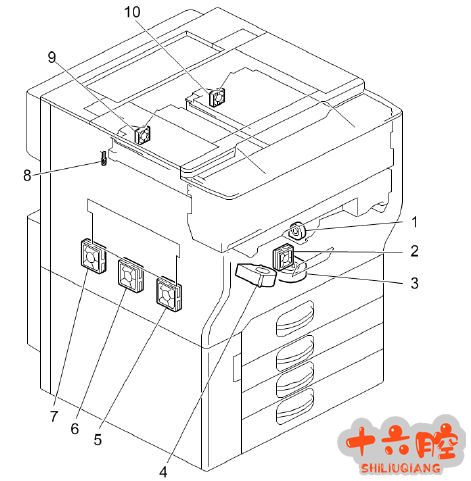
Phenomenon: Printing a small number of machines is normal, but if a job has dozens or even hundreds of pages, the machine will restart and display a paper jam. After eliminating the paper jam, the machine will automatically continue printing, and then automatically restart and deal with the paper jam. Maintenance process: 1. Upgrade to the latest firmware, replace PC drivers, applications, and other malfunctions still persist Many SC536-02 codes have been discovered in the history of SP7-403 SC. [kkpay=4]This code, like SC536-01, is defined as "paper cooling fan lock" (as shown in part 4 of the diagram, located in the drawer unit. The drawer unit panel needs to be removed to see it)
3. The output check code does not directly point to the "paper cooling fan" code. After testing, SP5-805-68 "Buffer Conveyor Unit Fan" was found to be the output check code for the paper cooling fan. If the power cord of the fan is unplugged in a normal machine, the same fault phenomenon will occur. (including issues such as restarts that may occur during the output check process) Solution:
|
Address of this article:https://073868.com/post/1143.html
Copyright Notice:
For relevant infringements, reports, complaints and suggestions, please send E-mail:weixiuwang68@qq.com







