
|
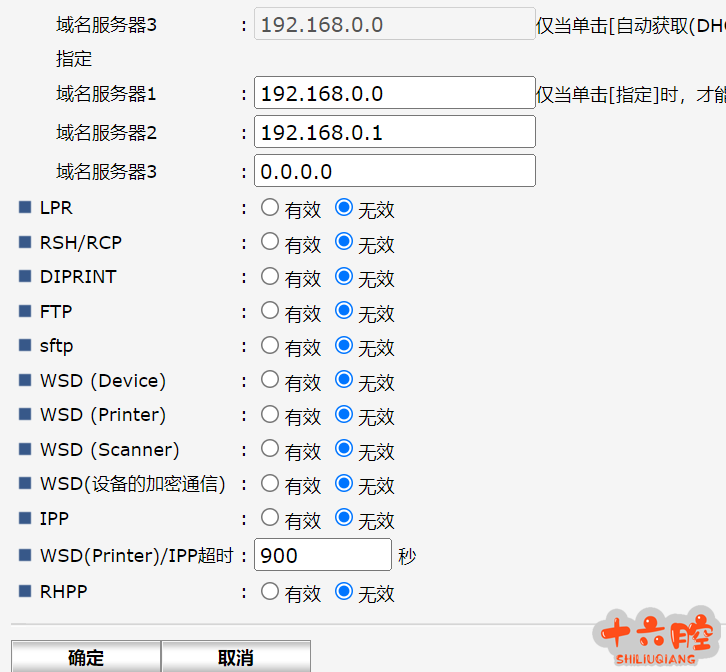
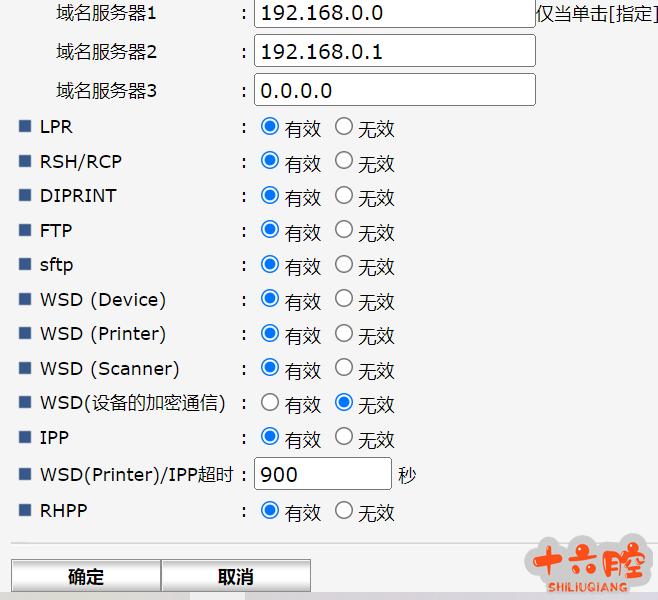
Fault phenomenon: The machine cannot print. Process: Upon arrival at the customer's location, it was discovered that when using network printing, the backend driver displayed that the job had been successfully sent, but the data receiving light on the copier did not flash, and the machine did not respond. Attempted to print using the USB port, and it was able to print normally, indicating that the malfunction was caused by network configuration issues. Process: First, initialize the user tool, but the machine still cannot print; Execute SP5801-003 until the end, execute SP5832 hard disk formatting, invalid; Execute SP5990-005 to print * C report and compare it with normal machine, no abnormalities found; Log in to the WEB page with an administrator account, click on "Device Management ->Configuration ->IPV4", and find that the settings under the "Details" option are all "Invalid". Compared with other machine settings, WSD (encrypted communication of devices) is invalid. All other options are valid. After modifying the invalid items to valid, the machine network prints normally. Conclusion: The execution of SP5801 code by the machine cannot restore the parameters of network settings, and manual inspection and modification are required. attached figure
|
Address of this article:https://073868.com/post/1061.html
Copyright Notice:
For relevant infringements, reports, complaints and suggestions, please send E-mail:weixiuwang68@qq.com
Tags: #Unable to print #2500 #3000 #3500 #WEB page







