
|
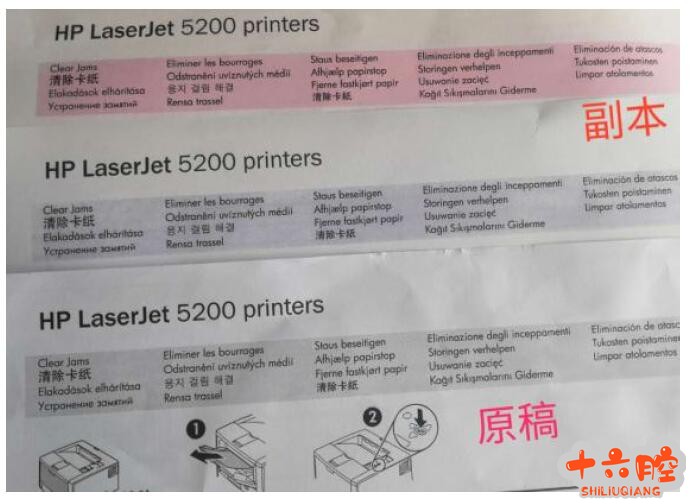
Symptoms: Whether copying or scanning black and white original documents, as long as automatic color selection is used, a red print will appear as shown in the following picture
Maintenance process: 1. The fault persists even after changing to different original modes 2. The fault persists after ACC operation 3. The user still fails to adjust the ADS background concentration in the tool
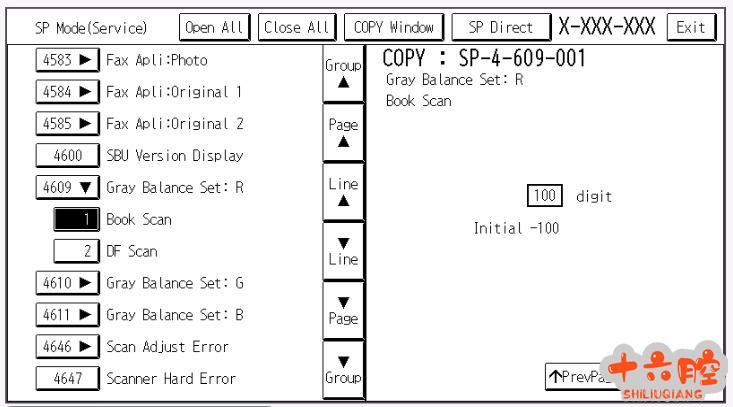
4. Upon checking the values in 4-609, 4-610, and 4-611, it was found that 4-609 differed significantly from other values (as shown in the figure below). Reset it to its default value and the machine will copy/scan normally Solution: Adjust the grayscale balance value to normal. (Default -100) |
Address of this article:https://073868.com/post/996.html
Copyright Notice:
For relevant infringements, reports, complaints and suggestions, please send E-mail:weixiuwang68@qq.com






