|
After the machine is installed, the network connection is normal, and the ping command can be used, but network functions such as printing and scanning cannot be used. Using the Ping command: 1, "run" input CMD, call up the Dos window 2. Enter the command: Ping the IP address of the device and press Enter It can be spelled, but the printing and scanning machines are not responding. The possible reason is that in order to increase network security, the "fast IP filtering" function is turned on by default to ensure that PCs on the same network segment can be used normally and other network segments cannot be used. If you encounter this kind of situation, just turn off the "fast IP filtering". for the following models, small partners remember to turn off the "fast IP filtering" when installing the machine ": B227/B287/B367/C226/C266/C227/C287/C308/C368/C658 Series/B958 Series The method is as follows:
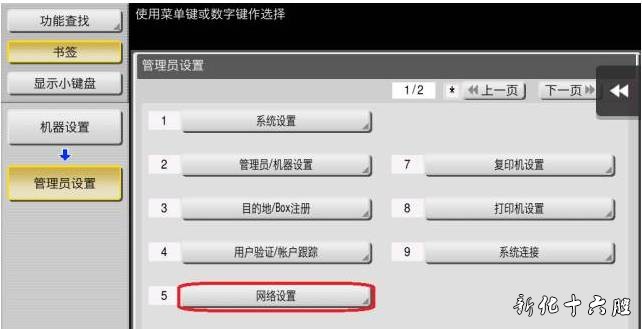
1. Enter the administrator management and select "Network Settings" Kemei Copier Network Printing No Response
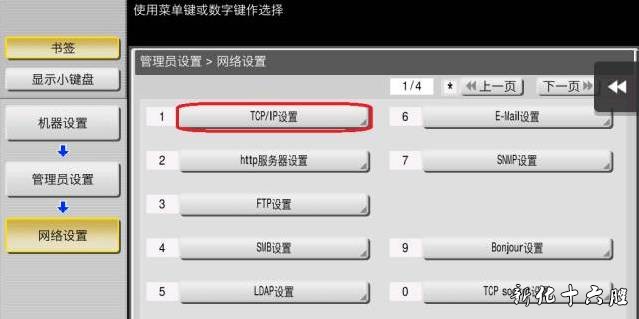
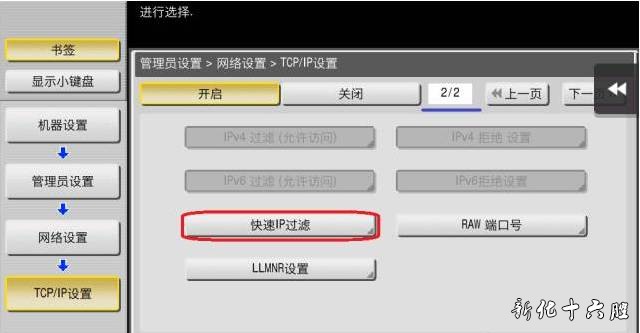
2, select "TCP/IP Settings" Kemei Copier Network Printing No Response 3. Turn to page 2 and select "Fast IP Filtering" Kemei Copier Network Printing No Response
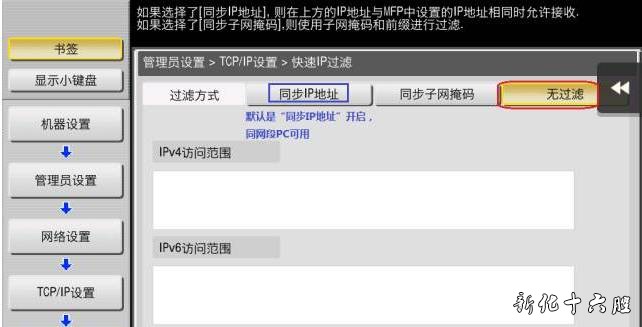
4. Select "No Filter" and press OK (the default is "Sync IP Address") Kemei Copier Network Printing No Response Setting is complete.
|
Kemei Copier Network Printing No Response
338
0