
|
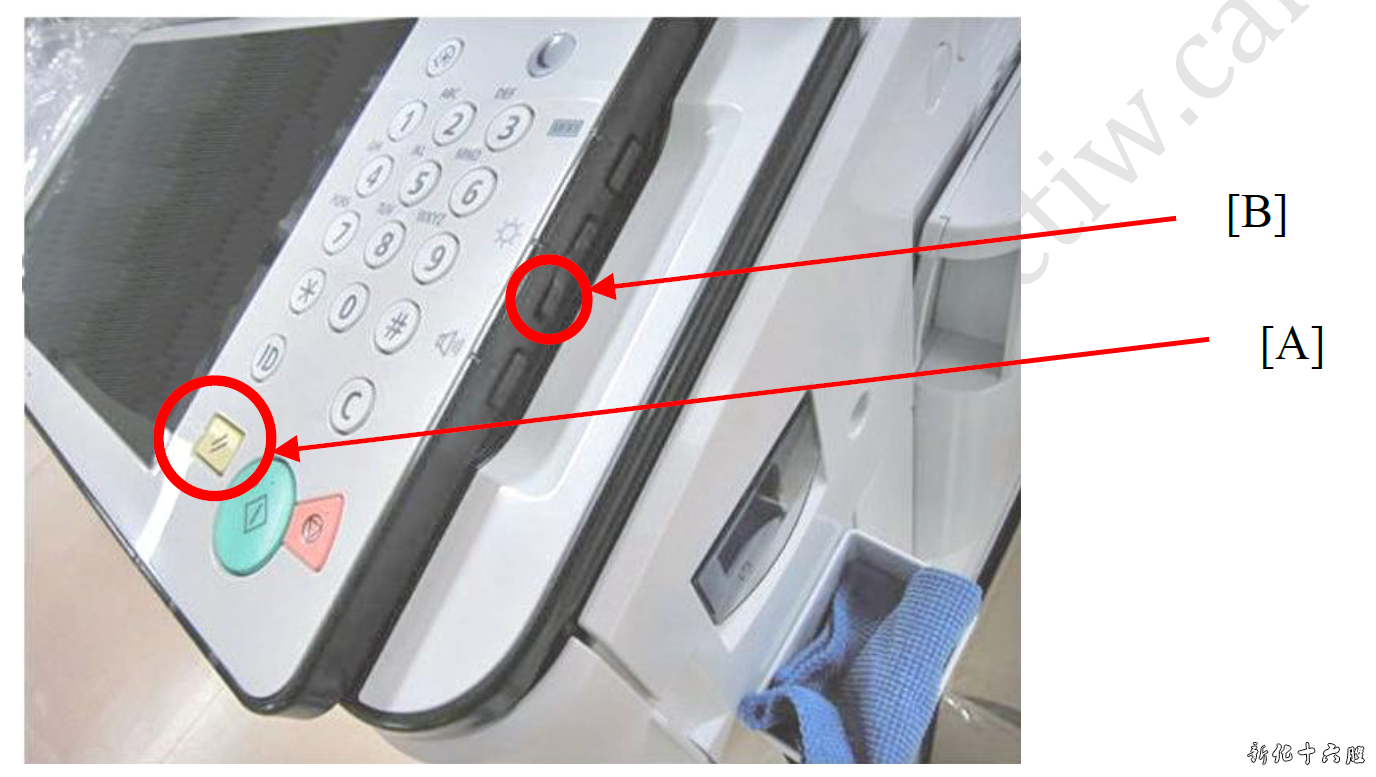
iR-ADV 65500 Series iR-ADV C5500 Series iR-ADV C7500 Series Fault phenomenon -When the touch screen is not responsive -When replacing the touch screen operation panel -When replacing the control panel CPU board Cause of the failure The sensitivity of the operation panel is reduced due to electromagnetic interference, or the operation after replacing the parts of the operation panel. On-site countermeasures Perform touch screen degaussing operation on site. Operation steps: 1. Turn off the host power 2. While pressing and holding the reset button [A] and the LCD brightness reduction button [B] on the control panel, turn on the main power switch and keep pressing and holding the [A] and [B] buttons.
3. After a few seconds, the control panel emits an end tone, and then the hand releases the pressed reset key and the LCD brightness reduction key. Note: ①. When performing the sensitivity calibration, remove the transparent film that protects the control panel assembly, because the inspection may not be performed correctly; ②. Do not touch the touch screen during calibration. ③. When the touch screen is touched when the power is turned on or the finger holding the reset button and the brightness reduction button is released before the end tone, The power needs to be turned off and the calibration performed again. |
Address of this article:https://073868.com/post/626.html
Copyright Notice:
For relevant infringements, reports, complaints and suggestions, please send E-mail:weixiuwang68@qq.com
Tags: #Calibration touch screen #Insensitive







